
ServerAlarmClock
1.2.1This plugin gives your Minecraft server a wake-up call, automatically restarting it when it decides to snooze.
- Tested MC versions
- 1.21
ServerAlarmClock
ServerAlarmClock is the perfect wake-up call for your Minecraft server! Ever tried to join a server that's still fast asleep? With ServerAlarmClock, your server will automatically start up when someone attempts to join, ensuring no one has to wait too long for the fun to begin.
Features
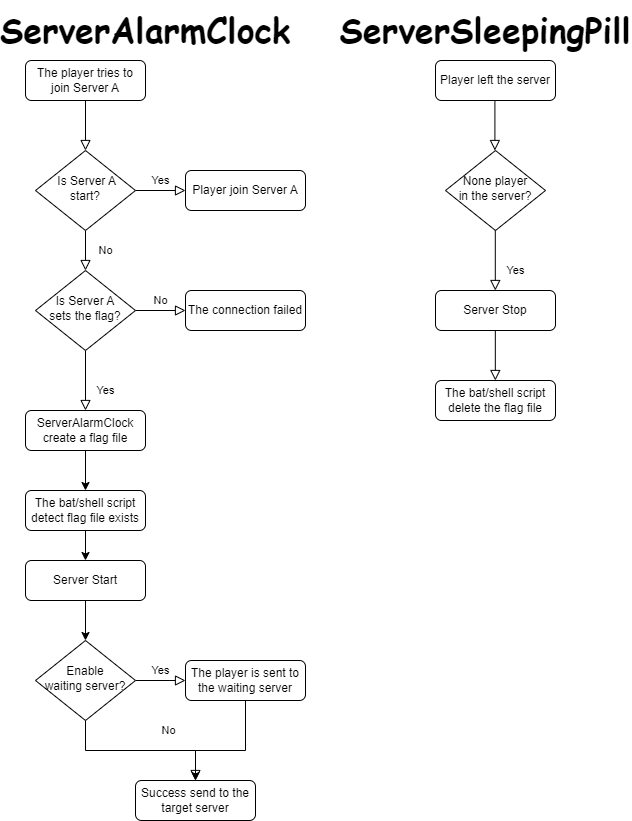
 Automatic Server Start: Your server will automatically boot up when a player attempts to join a stopped or sleeping server.
 Custom Messages: Send players fun and customizable messages while they wait for the server to start.
 Easy Configuration: Simple setup with a lightweight, no-hassle config.
Principle
Command
# reload your plugin config(serveralarmclock.reload)
/sac reload
How to Use
-
Install the Plugin:
- Download the
ServerAlarmClock.jarfile and place it in your BungeeCord plugins folder.
- Download the
-
Configure the Flags:
- Open the
config.ymlfile located in theServerAlarmClockfolder. - Under the
flagssection, specify the paths to the flag files for each of your servers. These flags will be used to trigger the server startup.
- Open the
-
Setup the Server Startup Script:
- You need to create or modify your server startup script to include the logic for checking the flag file. The example of a Linux shell script is provided at the end of this passage.
-
Start the Server:
- Once everything is configured, reload the plugin using /sac reload. The plugin will now monitor server connections and start the target server when a player attempts to join a server that is currently stopped.
-
Enjoy!
Example of a Linux shell script
#!/bin/bash

# Server directory
SERVER_DIR="your/server/path"

# Path to the flag file
FLAG_FILE="your/flag/file/path/example.flag"

# Change to the server directory
cd "$SERVER_DIR" || { echo "Failed to change directory to $SERVER_DIR"; exit 1; }
while true
do
  # Check if the flag file exists
  if [ -f "$FLAG_FILE" ]; then
    echo "Minecraft Server is Starting"

    # Start the server
    java -jar server.jar

    # Remove the flag file
    rm -f "$FLAG_FILE"

    echo "Minecraft Server has Stopped"
  else
    sleep 1
  fi
done
Example of a Windows bat script(generate by gpt)
@echo off

REM Server directory
set SERVER_DIR=your\server\path

REM Path to the flag file
set FLAG_FILE=your\flag\file\path\example.flag

REM Change to the server directory
cd /d "%SERVER_DIR%"
if %errorlevel% neq 0 (
    echo Failed to change directory to %SERVER_DIR%
    exit /b 1
)

:loop
REM Check if the flag file exists
if exist "%FLAG_FILE%" (
    echo Minecraft Server is Starting

    REM Start the server
    java -jar server.jar

    REM Remove the flag file
    del /f "%FLAG_FILE%"

    echo Minecraft Server has Stopped
) else (
    timeout /t 1 /nobreak >nul
)

goto loop
Similar projects
Plugin →VeinMiner
Mine the whole vein on mining a single ore/block. Make the tedious mining experience to something satisfying and fun! FTB Ultimine alternative
99.3MSueta
Simple Voice Chat
A working voice chat in Minecraft!
76.8MSueta
Let Me Despawn
Improves performance by tweaking mob despawn rules. Say bye to pesky unintentional persistent mobs.
25MSueta
Chunky
Pre-generates chunks, quickly and efficiently
18.4MSueta
VeinMiner Enchantment
Veinminer Addon - Adds vineminer enchantment to enchanting tables. Only tools with the enchantment can veinmine
18MSueta
JourneyMap
Real-time map used for mapping in-game or your browser as you explore.
14.7MSueta