
 ServerConnect
Connect Your Minecraft Servers — Without Proxies
ServerConnect is a lightweight and easy-to-use plugin that links multiple Paper and Spigot servers together without requiring Velocity, BungeeCord, Waterfall, or any other proxy software.
Create a seamless Minecraft network with:
 Global Chat
 Network-wide Join & Leave Messages
 Shared Player Counts
 Death & Advancement Synchronization
 Cross-Server Private Messaging
 Paper Server Transfers
 Network-wide Commands
Whether your servers are hosted on dedicated machines, VPSs, home servers, or through services like playit.gg and Ngrok, ServerConnect keeps your entire network synchronized.
 Features
💬 Global Network Chat
Chat with players across every connected server.
No matter where they are, everyone shares the same conversation.
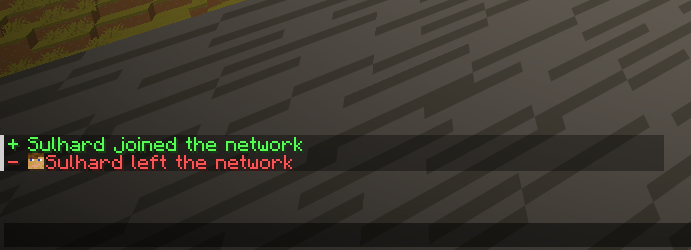
👋 Network Join & Leave Messages
Broadcast joins and quits across your entire network.
Fully configurable per server.
You can even choose to only display messages when players join the HUB server.
🚀 Paper Server Transfers
Transfer players between servers using:
/sc send <player> <server>
ServerConnect uses the modern Paper Transfer API for smooth server switching without a proxy.
📊 Shared Global Player Count
Display the combined player count of all connected servers.
Example:
- Server A: 15 players
- Server B: 20 players
Players see:
35 Online
instead of only the local server count.
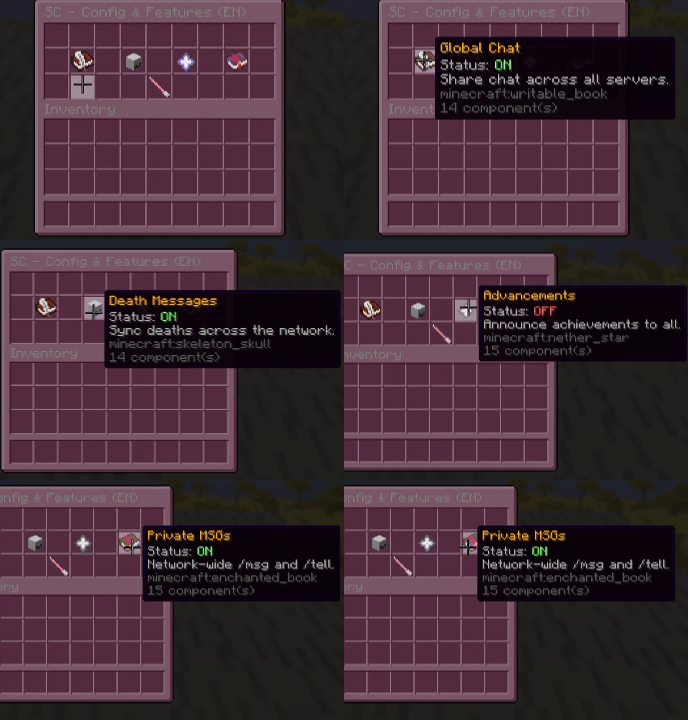
💀 Death & Advancement Synchronization
Keep your entire network connected.
- Share death messages
- Broadcast advancements
- Celebrate achievements together
✉️ Cross-Server Private Messaging
Send messages to players across every connected server.
Supported commands:
/msg
/tell
/w
Includes player name tab-completion.
⚡ Network Administration
Manage your entire network from any connected server.
Features:
- Execute commands on all servers
- View network status
- Transfer players
- Shutdown the entire network
- Real-time debugging tools
Simple Setup (HUB & NODE)
ServerConnect uses a straightforward HUB & NODE system.
👑 HUB (The Boss)
Choose one server to act as the central network hub.
Typically this is your lobby server.
Setup
- Set:
mode: HUB
- Choose a secure:
auth-key
- Open the configured port:
bind-port: 25560
in your firewall.
🛠️ NODE (The Helpers)
For every additional server:
- Set:
mode: NODE
- Enter the HUB address:
hub-host
- Use the same:
auth-key
That's it.
No Velocity.
No BungeeCord.
No Waterfall.
/sc help

 Commands & Permissions
| Command | Description | Permission |
|---|---|---|
/sc info | Show plugin information & Modrinth link | Everyone |
/sc help | Open the interactive GUI help menu | serverconnect.help |
/sc reload | Reload configuration and restart networking | serverconnect.reload |
/sc status | View connected servers (HUB marked) | serverconnect.status |
/sc send <player> <server> | Transfer a player | serverconnect.send |
/sc stop | Shutdown the whole network | serverconnect.stop |
/sc command <command> | Execute a command on all servers | serverconnect.command |
/sc debug | Toggle live network logs | serverconnect.debug |
/msg <player> | Cross-server private message | Everyone |
 In-Game Configuration
Manage important settings directly from Minecraft.
/sc setname <name>
Change the server name.
/sc setmode <HUB|NODE>
Switch network role.
/sc setkey <password>
Update authentication key.
/sc sethubip <IP:Port>
Set HUB transfer shortcut.
/sc hidetab <Server>
Hide players from a specific server in your local tab list.
/sc language <de|en>
Switch plugin language instantly.
 Global Tab List Setup
Because ServerConnect operates without a proxy, we use the Layout feature of TAB to display network-wide players.
1️⃣ Configure Player Format
In ServerConnect:
tab:
  format: "&b%player% &7(%server%)"
Example:
Steve (Lobby)
Alex (Survival)
Notch (Creative)
2️⃣ Enable Layouts in TAB
layout:
  enabled: true
3️⃣ Add Placeholders
Example:
- '24|%serverconnect_p1%'
- '25|%serverconnect_p2%'
- '26|%serverconnect_p3%'
Continue up to:
%serverconnect_p80%
ServerConnect automatically fills slots with players from all connected servers.
 PlaceholderAPI Support
PlaceholderAPI is required.
| Placeholder | Description |
|---|---|
%serverconnect_global_online% | Total players online across the network |
%serverconnect_server_online% | Players online on the current server |
%serverconnect_p1% → %serverconnect_p80% | Network player entries |
 Technical Requirements
Java
Java 21+
Minecraft Versions
Supported Versions
- Minecraft 1.20.1

- Minecraft 1.20.2
- Minecraft 1.20.3
- Minecraft 1.20.4
- Minecraft 1.20.5
- Minecraft 1.20.6
- Minecraft 1.21
- Minecraft 1.21.1
- Minecraft 1.21.2
- Minecraft 1.21.3
- Minecraft 1.21.4
- Minecraft 1.21.5
- Minecraft 1.21.6
- Minecraft 1.21.7
- Minecraft 1.21.8
- Minecraft 1.21.9
- Minecraft 1.21.10
- Minecraft 1.21.11
Tested On
- Minecraft 1.21.11
Notes
- The plugin is designed to work on Minecraft 1.20.1–1.21.11.
- Only Minecraft 1.21.11 has been tested so far.
Supported Server Software
- Paper (Highly Recommended)
- Purpur
- Pufferfish
- Spigot
 (Not Supported)
Paper is strongly recommended.
 Dependencies
Required
Without PlaceholderAPI several network features will not function correctly.
Recommended
Use TAB to display:
- Network player lists
- Global online counts
- Advanced layouts
- Scoreboards
 Network Requirements
HUB Server
Requires:
- One open firewall port
- Default:
25560 - Configurable in
config.yml
NODE Servers
Require:
- Outgoing internet access
- HUB address
- Matching authentication key
 Home Hosting Support
ServerConnect works perfectly with:
- playit.gg
- Ngrok
- Other TCP tunneling services
Simply use your tunnel address as the HUB host.
Performance
ServerConnect uses lightweight TCP communication and has minimal impact on server performance.
Designed for small and medium-sized Minecraft networks that want network-wide features without the complexity of traditional proxy solutions.
 Troubleshooting
Having connection issues?
Run:
/sc debug
ServerConnect can help identify:
- Invalid authentication keys
- Closed ports
- Connectivity problems
- Configuration mistakes
 Why ServerConnect?
No Velocity required
No BungeeCord required
No Waterfall required
Works across multiple machines
Home-hosting friendly
Shared chat, deaths and advancements
Fast and lightweight
Easy setup in minutes
❤️ Developed with Love by FelixFGF
Thank you for using ServerConnect.
Download the latest version on Modrinth and start connecting your servers today.
Similar projects
Plugin →VeinMiner
Mine the whole vein on mining a single ore/block. Make the tedious mining experience to something satisfying and fun! FTB Ultimine alternative
99.3MSueta
Simple Voice Chat
A working voice chat in Minecraft!
76.8MSueta
Chunky
Pre-generates chunks, quickly and efficiently
18.4MSueta
VeinMiner Enchantment
Veinminer Addon - Adds vineminer enchantment to enchanting tables. Only tools with the enchantment can veinmine
18MSueta
JourneyMap
Real-time map used for mapping in-game or your browser as you explore.
14.7MSueta
WorldEdit
A Minecraft Map Editor... that runs in-game! With selections, schematics, copy and paste, brushes, and scripting. Use it in creative, or use it temporarily in survival.
11.6MSueta