
SimpleCompass
1.2A compass plugin simple to use, to show directions and track positions, players...
SimpleCompass
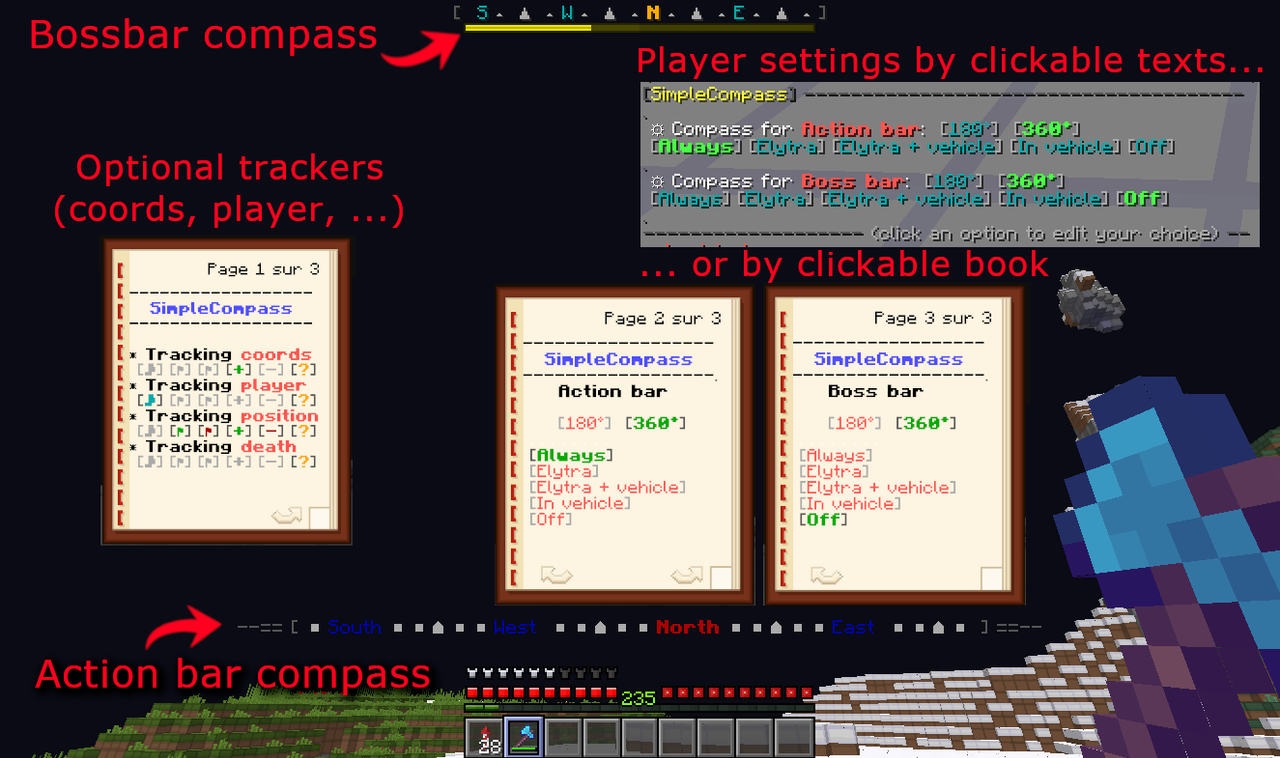
SimpleCompass was a small plugin which allows to display one (or two) compass in the action bar / boss bar area. It evolves to a "not so simple" compass plugin with lots of options and fully configurable. You can also extend it by using some optional modules which allows to track positions, players, ...
(BTW, thanks to @Shano_dekono for his suggestions and help to identify bugs in early versions!)
Players can easily change their settings with commands, they just have to click on the the one they want. There is also a combined interface in a clickable book which merge compass options and trackers' actions.
In-game options are:
- Use always the compass, never or only in vehicle and/or elytra.
- Use compass in 180° or 360° mode
You can also configure how the compass is (colors, symbols, size, ...) in the plugin config.yml file. There are lots of possibilities, for example, bossbar color, level, use elytra's durability as level, ... And the plugin is totally localisable (english and french locales files are provided by default).
HELP WANTED:
I would love to have videos showing and explaining the plugin in use, but I'm not good at making videos... If you are able to make one, send me the link (preferred on Youtube) and I will include it (with credit) on this page. English language is IMHO the most important, because it will be understandable by the most of users, but if you want to make a video in another language, I will include it too.
How to install
There is no dependencies, simply drop the jar file into your plugin directory, then restart (or reload) your server. All configuration parameters are explained in this config.yml.
To use the command sctrack, you need at least one tracker addon. You can find them here:
- CoordsTracker: Allows to track specific coordinates.
- DeathPosTracker: Allows to track the last death position.
- PapiPositionTracker: Allows to track positions defined using PlaholderAPI placeholders.
- PlayerTracker: Allows to track players positions.
- PositionTracker: Allows to track static positions.
(You have to download them separately and put them in "plugins/SimpleCompass/trackers" folder)
Need other tracker addons?
Have a look at the Spigot plugin thread, maybe other addons (made by other developers) will be listed.
If you have java skills, you can also develop your own tracker addon by extending the AbstractTracker class in a dedicated jar file, read code of those existing trackers as examples. In this case, send me a link, I will add yours in the list on the plugin page.
Make a custom tracker addon is very easy (at least for a dev), so if you need one, ask to a dev: He should be able to do it very quickly for free or low price.
1.12.2 version
If you're using 1.12.2, I've made a quick port, I will provide no support on it because I'm not using it, but it seems to work well. You can download the 1.12.2 version here. This is based on old version of this plugin with less features, sorry for users of 1.12.2 but I have no time to spend on a complete portage.
Permissions
All permissions are listed with a short description in this plugin.yml.
If you use trackers addons, other permissions are available.
Have a look at your trackers' Github page to know them.
Commands
- /scompass to show the book interface, the easiest way to use the plugin.
- /scompass-reload (or /screload) to reload the configuration.
- /scompass-option (or /scoption, or /scompass option [*]) to show a text based menu to choose where, when and how to display the compass, but as said before, the easiest way is /scompass.
- /scompass-track (or /sctrack, or /scompass track [*]), if you have at least one tracker addon installed, to manage your trackings.
- /scompass-toggle (or /sctoggle) to quickly toggle ON/OFF you compass(es)
You can use /scompass-option with arguments directly if you prefer ( /scompass-option <option> <type>).
[*]: "option" and "track" are default english keyword, you can change them in locale files. For example, in french, default are "option" and "piste".
Find a bug?
Too bad for you: Tired of reports without information and having to repeat the same thing over and over, I no longer provide any help. It took me time to write several versions of reporting guidelines for nothing... Thanks to those lazy persons!
If this plugin works for you, nice... Otherwise, uninstall it and leave a bad review if you want. I'm not writing my plugins for money or glory but for my personal use, then share them here.
But more important than anything: Take care of yourself, your friends and family. Minecraft is only a game, there is much more important in life!
Similar projects
Plugin →Let Me Despawn
Improves performance by tweaking mob despawn rules. Say bye to pesky unintentional persistent mobs.
26.2MSueta
JourneyMap
Real-time map used for mapping in-game or your browser as you explore.
14.7MSueta
Emotecraft
Create your own emotes in Minecraft.
7.9MSueta
Simple Tpa
A simple tpa plugin which sends requests
5.4MSueta
Common Network
Forge and Fabric Unified Networking Solution
4.7MSueta
Set Home
A lightweight plugin for players to set their homes.
3.8MSueta