
SkyGridx
26.2-1.21-backportExperience the Latest Blocks, Customize Your SkyGrid, and Enjoy Real-Time, Efficient Generation.
26.2-1.21-backportlatestSkyGridx 26.2-1.21-backportJul 16, 2026 For 1.21 to 1.21.11
- Backported SkyGrid 26.2 from Java 25 to Java 21 - Get all new features and improvements from 26.2 for older versions - One plugin build now supports Paper & Folia 1.21 through 1.21.11 - Fresh installs detect the server version & add the blocks, items, mobs & biomes available in that release - Newer 1.21 servers also get content from every earlier 1.21 update - Older servers won't receive content added in later versions - Existing config files are left unchanged when updating - Fixed version differences for mooshrooms, snow golems, chains & biome names Commands haven't changed. Existing servers keep their current settings, while fresh servers get defaults matched to their Minecraft version.26.2SkyGridx 26.2Jul 7, 2026 What's new in SkyGrid 26.2
* Updated for Paper and Folia 26.2 * Added the new 26.2 blocks to SkyGrid world generation: * Cinnabar * Sulfur * Potent Sulfur * Sulfur Spike * Cinnabar and Sulfur can now show up as normal SkyGrid blocks * Potent Sulfur and Sulfur Spike were added as rare blocks since they have special behavior * Material lists in the config files were cleaned up and sorted * Config comments were rewritten to be easier to read * Existing config help, examples, and format notes were kept * Fixed a YAML spacing issue that could cause config loading problems This update mainly keeps SkyGrid ready for Paper and Folia 26.2 and adds the new 26.2 blocks to world generation. Cinnabar and Sulfur should appear more often because they are normal blocks. Potent Sulfur and Sulfur Spike are much rarer because they behave differently from normal blocks. Old config setups should still work. If you already changed your config files, compare them before replacing them.26.1.2SkyGridx 26.1.2Jun 15, 2026 What's new in SkyGrid 26.1.2
- Updated for Paper and Folia 26.1.2 - SkyGrid now requires Java 25 - SkyGrid now focuses on Paper and Folia only (removed support for spigot and bukkit) - Folia has been update to remove the need for Datapack, as well as moved over to using the sql light system for chest - Better handling for beds, respawn anchors, portals, and SkyGrid world respawns - New compatibility settings for Multiverse, CMI, and other spawn/world plugins - Mini regen, fog, custom chests, Eyes of Ender, teleporting, and resource pack handling were updated for the new Paper/Folia scheduler system - New grid-face material options for more detailed SkyGrid block setups The biggest config feature is grid-face materials. Server owners can now attach blocks to the top, bottom, or sides of a picked SkyGrid block. Example:
 Old block config entries still work, so simple setups do not need to change. Note: A lot changed in the plugin code for this version. Please report any bugs you run into, especially if your server uses Multiverse, CMI, Folia, or another world/spawn manager.distributions: custom_mushroom_fields: GRASS_BLOCK: 25 top: SUGAR_CANE: 20 east: WATER: 101.20.6SkyGridx 1.20.6Jun 8, 2024 Optimization and Memory Usage Reduction:
- Boosted pregenerator performance by up to 25% - Enhanced generator, custom chest, spawner, and related utility classes to utilize the fastutil library, yielding a performance increase of up to 3-7% and significantly reducing memory usage (observed differences of up to 1.5GB in certain scenarios). - Optimized the custom chest class by minimizing the number of times the chest block is accessed. Used a "fake" chest represented by an array for item placement calculations, accessed the chest instance only twice, and implemented multithreading to significantly reduce processing time to get random chest items. - Improved material loading by adopting a new alias, resulting in more balanced loading between materials with and without biomes. Fetching random materials for both world and biome is now notably faster, reducing thread blocking during operations like /tpr. Additionally, precomputing wherever feasible and implementing caching mechanisms have been employed to further reduce fetch times for random materials. CPU usage during /tpr decreased from consistently hitting 100% across all cores for 2-3 seconds to a range of 80-90% for less than a second (test done with simulation-distance=8 and view-distance=8). Note: Many main classes have been almost fully overhauled to use the fastutil library. If you encounter any issues, please submit them on the [GitHub](https://github.com/DavidS-Repo/SkyGridx/issues) issue page. I tried my best to test every scenario I can think of, but I can't always catch every issue.1.20.4SkyGridx 1.20.4Apr 8, 2024 What’s New:
Pre-Generator Feature:
- Built in async pregenerator feature that allows for efficient world generation. This feature is accessible through the /pregen command, with customizable parameters for chunks per cycle and print update delay. - Works best on paper servers, on none paper servers the async functionality will not be used. Recommend you go into your paper server paper-global.yml and update these.
- Adjust io-threads and worker-threads to match your CPU’s thread count. Default settings utilize only half. - Usage: /pregen _chunksPerCycle_ _PrintUpdate_(DelayinMinutes) - For "chunksPerCycle" It’s recommended to match the number of threads your system has. For example, 12 threads yielded 50-80 chunks per second on a 5600x CPU, depending on server activity and other system tasks. - I left some headroom on CPU usage to decrease the likelihood of unintended block updates. I don't recommend playing while the pregeneration is happening, you can just let it run for a while if you don't want to play in a server and just want to generate the world, about 24 hours should be good enough.chunk-system: gen-parallelism: 'true' io-threads: 12 worker-threads: 12Command Updates:
- Removed the "/sgon" command, eliminating the need for user-triggered commands to turn on SkyGrid generation. It now starts automatically during the first boot or subsequent server restarts/reloads. This modification improves the user experience by providing a more user-friendly and automated approach to SkyGrid generation, making the plugin more intuitive for server administrators. This update is all about making your life easier and your server more efficient. I have been testing pregen for the last two months, if you run into any issue, please let me know ([here](https://github.com/DavidS-Repo/SkyGridx/issues)).1.20.2SkyGridx 1.20.2Nov 14, 2023 Chest Support Added
New Feature: Chest Support Added
Key Features:
- Flexible Loot Customization: Tailor chest loot settings with precision, specifying the items, percentages, and amounts. - Tiered Loot Distribution: Items are distributed into tiers, adding variety and complexity to the loot. Each tier has its own set of items with different probabilities. - Biome-Specific Chests: Customize chest loot for specific biomes, allowing for a more immersive and thematic distribution of items based on the environment. - Easy Configuration: Edit the ChestSettings.yml file located in the SkygridBlocks folder to define the loot settings for each chest. Use compact or expanded formatting for easy customization.How to Use:
1. Update your plugin to the latest version. 2. Configure Chests: Open the ChestSettings.yml file located in the plugin's SkygridBlocks folder. 3. Customize Loot Settings: Define the loot settings for each chest in the configuration file. Use the provided examples as a guide.# The available items for use can be found at https://hub.spigotmc.org/javadocs/bukkit/org/bukkit/Material.html # The available biomes can be found here: https://hub.spigotmc.org/javadocs/bukkit/org/bukkit/block/Biome.html # In YAML, identifiers or keys (such as "Chest1" in your example) are subject to certain rules. # - Do's - # Alphanumeric Characters: Identifiers can contain letters (both uppercase and lowercase) and numbers. For example, "Chest1" is a valid identifier. # Underscores: You can use underscores (_) in identifiers. For instance, "my_chest" is a valid identifier. # Hyphens in Quoted Strings: If an identifier contains special characters or spaces, you can enclose it in single or double quotes. For example, "'Special Chest'" or "\"Special Chest\"" are valid. # - Don'ts - # Special Characters: Avoid using special characters like !, @, #, $, %, etc., in identifiers without enclosing them in quotes. For example, "Chest@123" should be written as "'Chest@123'" if you want to use special characters. # Leading Spaces: Identifiers should not have leading spaces. For instance, " MyChest" with a space at the beginning is not a valid identifier. # Trailing Spaces: Similarly, identifiers should not have trailing spaces. "MyChest " with a space at the end is not valid. # Spaces in the Middle: While you can use spaces within identifiers if they are enclosed in quotes, it's generally a good practice to avoid spaces within identifiers for clarity. For example, "My Chest" is valid, but "MyChest" is more commonly used. # Reserved Keywords: Avoid using YAML reserved keywords as identifiers. These keywords have special meaning in YAML and should not be used as keys. For example, "true," "false," and "null" are reserved keywords. # Case Sensitivity: YAML is case-sensitive. "myChest" and "MyChest" would be considered as two different identifiers. # ChestSettings: This is the top-level section of the YAML configuration and acts as the main container for all chest settings. # Chest1: This represents the first chest configuration, which we'll be using as an example. The code will look for a chest configuration with the key "Chest1." The key can be whatever you want; it serves as an identifier. # Items: Under the "Chest1" configuration, there is an "Items" section. The code will process the items listed here to determine what should be placed in the chest's inventory. Formatting: "- ITEM_NAME:PERCENTAGE:MAX_AMOUNT" # Biomes: This section lists the biomes in which the chest's item configuration will apply. Formatting: "- BIOME_NAME"Example with Expanded Formatting:
ChestSettings:
  Chest1:
    Items:
      - MYCELIUM:30:5
      - RED_MUSHROOM:20:5
      - BROWN_MUSHROOM:20:5
      - RED_MUSHROOM_BLOCK:10:5
      - BROWN_MUSHROOM_BLOCK:10:5
      - MUSHROOM_STEM:10:5
    Biomes:
      - MUSHROOM_FIELDS

# The YAML above will be interpreted as follows:

# For a chest located in the "MUSHROOM_FIELDS" biome, the code will use the specified item settings to randomly populate the chest's inventory. The percentage chances and amount ranges for each item will be considered when filling the chest.
# MYCELIUM:30:5 - This line specifies an item with the name "MYCELIUM" with a chance of 30% (percentage) of being placed in the chest, and the max amount of this item is 5. The code will randomly select a value between 1 and 5 for the number of MYCELIUM to place in the chest.
Example with Compact Formatting:
Sample of 10 chest from the Overworld, Nether, and End with the included Pre-Configuration. 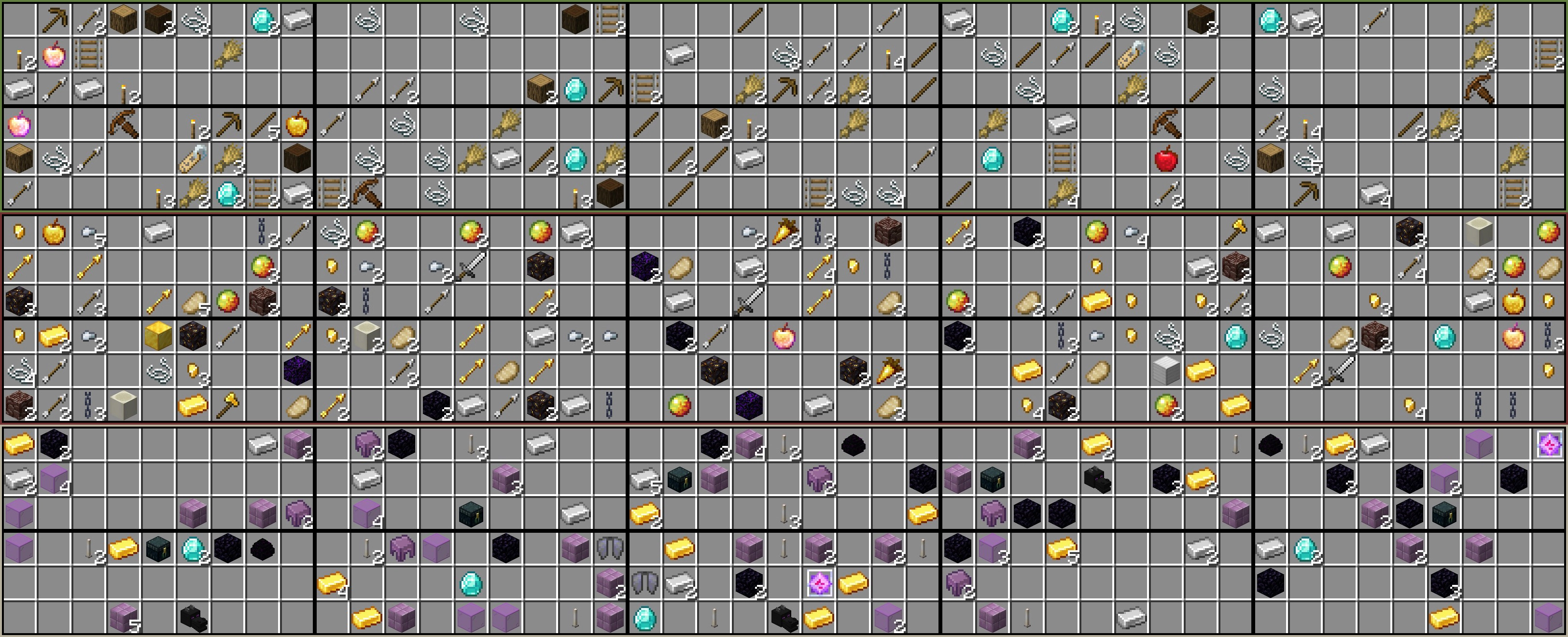ChestSettings: Chest1: Items: [WOODEN_AXE:20:1, WOODEN_PICKAXE:20:1, CROSSBOW:20:1, ...] Biomes: [BADLANDS, BAMBOO_JUNGLE, BIRCH_FOREST, ...] # This is a more compact way of formatting the above. Both versions are valid. # How to format item entries: [ITEM_NAME:PERCENTAGE:MAX_AMOUNT]. If there is more than one item, you can do [ITEM_NAME:PERCENTAGE:MAX_AMOUNT, ITEM_NAME:PERCENTAGE:MAX_AMOUNT]. # If you are doing multiple biomes, this is also a more compact way of formatting it. # How to format biome entries: [BIOME_NAME]. If there is more than one biome, you can do [BIOME_NAME, BIOME_NAME].
Similar projects
Plugin →VeinMiner
Mine the whole vein on mining a single ore/block. Make the tedious mining experience to something satisfying and fun! FTB Ultimine alternative
99.3MSueta
Simple Voice Chat
A working voice chat in Minecraft!
76.8MSueta
Chunky
Pre-generates chunks, quickly and efficiently
18.4MSueta
VeinMiner Enchantment
Veinminer Addon - Adds vineminer enchantment to enchanting tables. Only tools with the enchantment can veinmine
18MSueta
JourneyMap
Real-time map used for mapping in-game or your browser as you explore.
14.7MSueta
WorldEdit
A Minecraft Map Editor... that runs in-game! With selections, schematics, copy and paste, brushes, and scripting. Use it in creative, or use it temporarily in survival.
11.6MSueta