
Smart Menus | #1 Advanced Custom GUI Menus, Conditions & Dyn
3.6Powered By the famous and well known SmartInvs API By Minskube
- Tested MC versions
- 1.21, 26.1, 26.2, 26.3
⚡ SmartMenus
The most powerful, feature-rich GUI plugin ever built for Minecraft.
Built on the legendary SmartInvs API — engineered to do what no other menu plugin can.
Why SmartMenus Destroys Every Other GUI Plugin
You've tried DeluxeMenus. You've tried ChestCommands. You've tried TrMenu. You've tried zMenu. They all hit a wall the moment your ideas get ambitious.
SmartMenus has no wall.
Every other GUI plugin was built for simple shops. SmartMenus was built for everything — shops, quest boards, rank upgrades, server selectors, dynamic player menus, sacrifice altars, full-screen GUIs that take over your entire inventory. If you can imagine it, SmartMenus can build it.
This is not just another menu plugin. This is the last menu plugin you will ever need.
⚙️ Built on SmartInvs — The Gold Standard of GUI APIs
SmartMenus is powered by SmartInvs, the most respected and widely-used GUI framework in the Minecraft ecosystem. SmartInvs gives SmartMenus a rock-solid foundation that lesser plugins simply don't have:
Tick-accurate rendering — items update on a per-tick basis without flicker or desync
Full inventory type support — CHEST, HOPPER, DISPENSER, FURNACE, BREWING STAND, CRAFTING, and more
Thread-safe state management — no inventory corruption under heavy load
Smooth pagination — native page-by-page navigation with zero boilerplate
Event-driven click handling — every click type (LEFT, RIGHT, SHIFT, MIDDLE, DOUBLE) captured cleanly
Every SmartMenus GUI is a SmartInvs-powered inventory under the hood. That means stability, performance, and flexibility that YAML-only GUI plugins simply cannot match.
FULL BEDROCK FORMS SUPPORT
SmartMenus 2.1 brings full native Bedrock/Geyser support the most requested feature since launch , every GUI you've already built can now automatically serve Bedrock players without touching a single config file.
Bedrock Support WITH Zero Extra Work??
YES ! existing Java GUIs can automatically convert into Bedrock forms
No need to rebuild menus
No duplicate configurations
Works seamlessly with Geyser
Floodgate detection supported automatically
Multiple Form Types
SmartMenus now supports:
Simple Forms
Modal Forms
Custom Forms
Dialogue Forms
Giving you complete control over the Bedrock experience.
Bedrock Actions:
Two new action types have been added:
* `OPEN_BEDROCK_FORM`
* `OPEN_BEDROCK_DIALOGUE`
Allowing you to open Bedrock-specific interfaces directly from buttons and actions.
Auto Conversion System
Simply enable auto conversion and SmartMenus will handle the rest.
Your Java GUI → Bedrock Form conversion happens automatically.
14 Button Types — More Than Any Other Plugin
Most GUI plugins give you clickable items. SmartMenus gives you a complete interactive system:
NONE — Standard clickable item with actions & conditions
INVENTORY — Open another GUI (with full navigation history)
BACK — Return to the previous GUI in the navigation stack
HOME / MAIN_MENU — Jump directly to the root menu from anywhere
NEXT / PREVIOUS — Page navigation with optional permanent display
JUMP — Skip directly to any page number
PAGINATION — Display a static list of items across multiple pages automatically
DYNAMIC_PAGINATION — Live server data rendered as clickable items (see below)
SWITCH — Multi-state toggle buttons driven by PlaceholderAPI or static keys
INPUT — Item slots players can drop items into, firing commands on placement
CHAT_INPUT — Prompts the player to type in chat, captures the response as a variable
No other free GUI plugin comes close to this feature depth.
━━━━━━━━━━━━━━━━━━━━━━━━━━━━━━━━━━━━━━━━━━━━━━━━━━━━━━━━━━━━
Dynamic Pagination — Live Server Data as GUI Items
This is where SmartMenus truly separates itself. DYNAMIC_PAGINATION sources pull live data from your server and renders it as interactive items — automatically, in real time.
Built-in data sources:
ONLINE_PLAYERS — Render every online player as a skull item. Click to teleport, view stats, open admin menus — anything. Shows name, UUID, world, health, level, ping, gamemode.
WORLDS — All loaded worlds as clickable items. Show player count, time, difficulty. Click to teleport.
PLAYER_INVENTORY — Displays the viewer's own inventory as GUI items. With take-item: true, clicking removes the item. With give-item: true, clicking gives a copy.
PLAYER_ENDERCHEST — Same as above but for the ender chest. Combine take + give to move items from ender chest → main inventory with a click.
PERMISSION_GROUPS — All LuckPerms groups rendered as items. Perfect for rank upgrade menus.
# Online players list — click a player to open admin actions
online-players:
  type: DYNAMIC_PAGINATION
  source: ONLINE_PLAYERS
  slots: [ 10-16, 19-25, 28-34 ]
  material: PLAYER_HEAD
  name: "&e%player_name%"
  lore:
    - "&7World: &f%player_world%"
    - "&7Level: &a%player_level%"
    - "&7Ping: &b%player_ping%ms"
    - ""
    - "&eClick to teleport →"
  click_actions:
    LEFT:
      - type: CONSOLE_COMMAND
        command: "tp {player} %player_name%"
━━━━━━━━━━━━━━━━━━━━━━━━━━━━━━━━━━━━━━━━━━━━━━━━━━━━━━━━━━━━
️ Full-Screen GUIs — 90 Interactive Slots (Two Rendering Modes)
SmartMenus is the only GUI plugin with a use_bottom_inventory feature — and it ships with two distinct rendering engines so you can choose the right trade-off for your server.
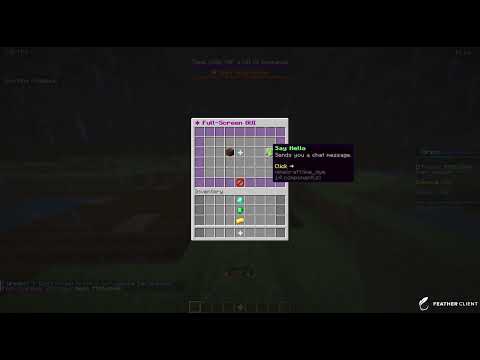
90 total interactive slots — 54 from the chest GUI + 36 from the player's inventory area
Immersive full-screen menus that fill the entire Minecraft inventory screen
All 90 slots support actions, conditions, and every button type
Two modes — pick the one that fits your setup
DEFAULT mode (no extra plugins required)
Saves the player's real inventory on open, fills those slots with GUI items, and restores everything perfectly on close, quit, and server reload. Zero item loss under normal conditions.
PACKET_EVENT mode (requires PacketEvents)
The correct, server-grade approach. GUI items are sent to the client as packets only — the real inventory is never touched or modified at any point. This means:
No snapshot required — real items stay in memory exactly where Minecraft put them
Crash-safe — a server crash cannot corrupt or lose player inventory because it was never modified
No updateInventory() flicker — changes are precise, per-slot packet updates
Seamless navigation — switching between GUIs is invisible to the client
SmartMenus auto-detects PacketEvents at startup and prints which mode is available in the console banner.
full_screen_hub:
  title: "&5&l✦ Server Hub"
  rows: 6
  use_bottom_inventory: true
  bottom_inventory_mode: PACKET_EVENT   # DEFAULT or PACKET_EVENT

  items:
    # ... top 54 slots ...

  bottom_items:   # ← bottom 36 slots (player inventory area)
    survival-btn:
      slot: 4
      material: GRASS_BLOCK
      name: "&a&lSurvival Server"
      actions:
        - type: SERVER_CONNECT
          server: "survival-1"
━━━━━━━━━━━━━━━━━━━━━━━━━━━━━━━━━━━━━━━━━━━━━━━━━━━━━━━━━━━━
⚡ 16 Action Types — Execute Anything On Click
PLAYER_MESSAGE — Send a colored message to the player
BROADCAST — Announce to the entire server
ACTION_BAR — Display text above the hotbar
TITLE — Full screen title with subtitle, fade-in, stay, fade-out control
SOUND — Play a sound for the clicking player (volume + pitch control)
BROADCAST_SOUND — Play a sound for every player online
CONSOLE_COMMAND — Execute any command as console
PLAYER_COMMAND — Execute a command as the player
RANDOM_CONSOLE_COMMAND — Pick a random command from a list (loot tables!)
RANDOM_PLAYER_COMMAND — Same but as the player
TELEPORT — Teleport to any world, X/Y/Z, yaw, pitch
OPEN_INVENTORY — Open another GUI by ID
CLOSE_INVENTORY — Close the current GUI
BACK — Navigate to the previous GUI
SERVER_CONNECT — Send player to a BungeeCord/Velocity server
SCRIPT — Execute inline JavaScript (Nashorn/GraalVM) for unlimited custom logic
Every action supports per-click-type targeting — assign different actions to LEFT, RIGHT, SHIFT_LEFT, SHIFT_RIGHT, MIDDLE, and DOUBLE_CLICK independently:
rank-upgrade:
  type: NONE
  slot: 22
  material: NETHER_STAR
  name: "&d&lRank Upgrade"
  click_actions:
    LEFT:
      - type: PLAYER_MESSAGE
        message: "&7Left click to preview, &eshift+left to confirm purchase."
    SHIFT_LEFT:
      - type: CONSOLE_COMMAND
        command: "lp user {player} parent set vip"
      - type: SOUND
        sound: ENTITY_PLAYER_LEVELUP
      - type: TITLE
        title: "&d✦ RANK UP ✦"
        subtitle: "&7You are now &dVIP&7!"
━━━━━━━━━━━━━━━━━━━━━━━━━━━━━━━━━━━━━━━━━━━━━━━━━━━━━━━━━━━━
23 Condition Types — The Most Comprehensive Gate System
Click to expand all 23 condition types
Economy Conditions
Click to expand all 23 condition types
VAULT_MONEY — Require & deduct Vault money
OREO_CURRENCY — Require & deduct any OreoEssentials custom currency (tokens, gems, crystals, anything)
XP_LEVEL — Require & deduct XP levels
XP_POINTS — Require & deduct total XP points
Item Conditions
ITEM — Require & consume vanilla Minecraft items
ITEM_CUSTOM_MODEL — Require items with a specific custom model data value
ITEMSADDER — Require & consume ItemsAdder custom items
NEXO — Require & consume Nexo custom items
Permission & Rank Conditions
PERMISSION — Require (or deny) a Bukkit permission node
LUCKPERMS_GROUP — Require membership in a LuckPerms group (with inheritance support)
Location & World Conditions
WORLD — Require player to be in specific world(s), or blacklist worlds
WEATHER — Require specific weather (clear / rain / thunder)
WORLDGUARD_REGION — Require player to be inside a WorldGuard region
OREO_WARPS — Check if an OreoEssentials warp exists or player has permission
OREO_WARPS_LOCATION — Require player to be within N blocks of a warp
MODELED_NPC — Require player to be near a ModeledNPC by ID
Click to expand all 23 condition types
Placeholder & Logic Conditions
PLACEHOLDER — Compare any PlaceholderAPI value with ==, !=, >, >=, <, <=
PLACEHOLDER_EQUALS — Check if a placeholder equals a string (case-insensitive)
PLACEHOLDER_CONTAINS — Check if a placeholder contains a substring
PLACEHOLDER_GREATER_THAN — Check if a placeholder number exceeds a value
PLACEHOLDER_LESS_THAN — Check if a placeholder number is below a value
EXPRESSION — Full math/logic expression engine: %player_level% * 2 > 30, %vault_balance% >= 5000 && %player_health% > 10
SCRIPT — Inline JavaScript condition for truly unlimited logic
Conditions work in two modes:
conditions: — Item is always visible, but clicking it checks (and consumes) the condition
view-requirements: — Item is hidden entirely if the condition fails (shows else-item instead)
━━━━━━━━━━━━━━━━━━━━━━━━━━━━━━━━━━━━━━━━━━━━━━━━━━━━━━━━━━━━
✨ Every Item Property You Could Ever Need
material: Any Minecraft material
item_type: vanilla / itemsadder / nexo / headdatabase
item_id: Custom item namespace (e.g. iasurvival:ruby)
custom_model_data: Resource pack model override
name: Full color support — legacy &codes, &#hex, gradients, rainbow, PlaceholderAPI
lore: Multi-line, full color + placeholder support on every line
glow: Enchantment glow effect without showing enchant names
item_flags: HIDE_ENCHANTS, HIDE_ATTRIBUTES, HIDE_POTION_EFFECTS, and more
enchantments: Any enchantment at any level
update: true + update-interval: Auto-refresh lore/name with live placeholders
is-permanent: Keep NEXT/PREVIOUS buttons visible even on first/last page
take-item: true — Remove item from player inventory/enderchest on click
give-item: true — Give item to player inventory on click
close: true — Auto-close GUI after click
━━━━━━━━━━━━━━━━━━━━━━━━━━━━━━━━━━━━━━━━━━━━━━━━━━━━━━━━━━━━
Advanced Color & Text System
Legacy color codes — &0-f, &l, &o, &n, &k, &m, &r
Hex colors — &#FFD700, �FFFF, any RGB value (1.16+)
Gradients — <gradient:#FF0000:#FFD700>text</gradient>
Rainbow — <rainbow>text</rainbow>
PlaceholderAPI — Any %placeholder% in names, lore, titles, messages
Dynamic variables — Source-provided placeholders like %player_name%, %world_players%, %item_amount%
Command args — %arg_name% from GUI open commands
name: "<gradient:#00AAFF:#FFD700>&l⭐ %player_name%'s Reward ⭐</gradient>"
lore:
- "�FFFF Balance:  CD32$%vault_eco_balance%"
- "<rainbow>✦ Ultra Premium Item ✦</rainbow>"━━━━━━━━━━━━━━━━━━━━━━━━━━━━━━━━━━━━━━━━━━━━━━━━━━━━━━━━━━━━
️ GUI-Level Power Features
inventory_type: CHEST, HOPPER, DISPENSER, DROPPER, FURNACE, BLAST_FURNACE, SMOKER, BREWING_STAND, CRAFTING
rows: 1–6 for chest GUIs
commands: Multiple commands that open the same GUI
use_bottom_inventory: 90-slot full-screen mode (unique to SmartMenus)
bottom_inventory_mode: DEFAULT (save/restore) or PACKET_EVENT (zero inventory modification, crash-safe)
main_menu: Home button target for nested navigation trees
npc_id: Bind GUI to a ModeledNPC — open by right-clicking
fill: Fill all empty slots with a configurable background item
patterns: Reusable slot layouts applied before items load
args: Typed command arguments (%arg_name%) passed when opening the GUI
━━━━━━━━━━━━━━━━━━━━━━━━━━━━━━━━━━━━━━━━━━━━━━━━━━━━━━━━━━━━
TOOL: SmartMenus Visual Builder
Introducing the SmartMenus Builder — a 100% free, browser-based visual editor. No downloads. No registration. No YAML syntax errors.
What it does:
Visual slot grid — click any slot to edit it
Full support for all 14 button types
All 23 condition types with guided forms
All 16 action types with per-click-type targeting
Live YAML preview with syntax highlighting
One-click download of the finished .yml file
Auto-save — your work is never lost
Import existing YAML to edit it visually
Before SmartMenus Builder:
Write YAML → Fix indentation errors → Fix syntax errors → Upload → Test → Fix mistakes → Repeat
Time: 30+ minutes
With SmartMenus Builder:
Click slots → Fill forms → Download → Upload → Done
Time: 3 minutes 
━━━━━━━━━━━━━━━━━━━━━━━━━━━━━━━━━━━━━━━━━━━━━━━━━━━━━━━━━━━━
Perfect Combo: SmartMenus + OreoEssentials
SmartMenus integrates deeper with OreoEssentials than any other plugin:
Unlimited custom currencies — tokens, gems, crystals, shards, whatever your server uses
Warp location gates — require players to be physically near a warp to interact
Warp permission checks — gate items behind warp unlock status
Cross-server support — the only true multi-server economy SmartMenus can tap into
vip-kit:
  slot: 22
  material: DIAMOND_SWORD
  name: "<gradient:#FFD700:#00FFFF>&lLegendary Kit</gradient>"
  lore:
    - "&7Cost: &e100 Tokens &7+ &650 Gems"
    - "&7Must be at the Spawn warp"
  conditions:
    - type: OREO_CURRENCY
      currency: "tokens"
      amount: 100
    - type: OREO_CURRENCY
      currency: "gems"
      amount: 50
    - type: OREO_WARPS_LOCATION
      warp: "spawn"
      radius: 15.0
[→ Get OreoEssentials Here ←]
━━━━━━━━━━━━━━━━━━━━━━━━━━━━━━━━━━━━━━━━━━━━━━━━━━━━━━━━━━━━
Real-World Examples
Similar projects
Plugin →Let Me Despawn
Improves performance by tweaking mob despawn rules. Say bye to pesky unintentional persistent mobs.
25MSueta
JourneyMap
Real-time map used for mapping in-game or your browser as you explore.
14.7MSueta
Emotecraft
Create your own emotes in Minecraft.
7.5MSueta
Simple Tpa
A simple tpa plugin which sends requests
5.4MSueta
Common Network
Forge and Fabric Unified Networking Solution
3.9MSueta
Set Home
A lightweight plugin for players to set their homes.
3.8MSueta