

INFO
S m a r t Chat is a lightweight plugin with everything you need to start your private server: it's fully customizable, doesn't affect server performance and there's no need to setup - everything just works from the start!
FEATURES
- Color codes in chat messages ('&')
- Custom chat format
- JSON chat format (supports Minecraft 1.13 or newer)
- Turning the chat on/off
- Clearing the chat
- Simple custom chat announcements
- Chat mentions (tagging players in chat messages)
- Location tags (easily sending your current location)
- Admin chat
- Custom join and leave messages
- Automatic plugin locale (for now English and Polish)
- Fully customizable and translatable
COMMANDS
Main command: /chat
Aliases: /sc, /smartchat
- /chat off - turns the chat off so nobody can write messages
- /chat on - turns the chat back on
- /chat clear - clears the chat
- /chat send <message> - sends custom announcement to all players (without any prefixes, just the message)
- /chat reload - reloads locale files and configuration
Admin chat command: /adminchat
Alias: /ac
- /adminchat <message> - sends a message on admin chat
PERMISSIONS
- smartchat.* - gives access to every SmartChat function
- smartchat.command - allows to use whole /chat command
- smartchat.color - allows to use color codes in chat messages
- smartchat.mute - allows to toggle chat on/off
- smartchat.mute.bypass - allows to write when the chat is turned off
- smartchat.clear - allows to clear the chat
- smartchat.send - allows to send custom chat announcements using /chat send
- smartchat.admin - allows player to write and receive admin chat messages
- smartchat.mentions - allows to use chat mentions
- smartchat.mentions.ignore - makes player ignore chat mentions
- smartchat.location - allows to use location tag in chat messages
- smartchat.reload - allows to reload SmartChat configuration and locale files
GUIDES
Chat mentions
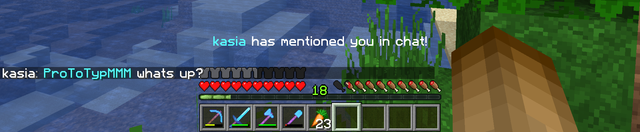
When one player mentions another, mentioned player will be notified with a sound and an action bar message (customizable in the config). There's no need to use @ or any other character before the nickname. Also, mentioned player (and noone else!) will see their nickname in the message in a different color, specified in the config file.
Spoiler
Location tag
Players can use :loc: tag in chat messages and it will be changed to their current location.
Spoiler


Custom locale
In the config file you can choose which locale to use - it will affect all messages. Currently supported locales are en (English) and pl (Polish) .
However, there's no problem with creating your custom locale in case your language is not supported or you simply want to change the look of the messages. In order to do that:
- Open SmartChat.jar with any file archiver (for example WinRAR or 7Zip).
- There you will find a file named messages_<locale>.properties . Extract the file you want to edit and put it in plugins/SmartChat folder, next to the config file.
- Edit values in the extracted file and don't forget to change the locale in the config.yml to match your new file.
- Reload the plugin.
You can even change only some of the messages and all others will be taken from the original locale files.
JSON chat format
JSON format consists of one or more parts - you can create as many as you like. Each of them must have the following syntax:
name-of-a-part  :
  message   :   "this will be displayed"
  hover-action   :   "SHOW_TEXT"
  hover-value   :   "value for the above action"
  click-action   :   "SUGGEST_COMMAND"
  click-value   :   "/value for the above action"
Please note that:
- part name doesn't really matter
- message is the only required field
- if you use hover-action , you have to specify hover-value (the same goes with click-action and click-value )
- message , hover-value and click-value support color codes ('&')
- hover-value also supports multi-line text
- the final message is composed of all parts with a single space between them
- possible variables, hover actions and click actions are listed in the config file
Here is an example:
Spoiler
prefix  :
  message   :   "&c[AdminChat]"
name  :
  message   :   "&0{player}&7:"
  hover-action   :   "SHOW_TEXT"
  hover-value   :   "Click to send a private message to &d{player}"
  click-action   :   "SUGGEST_COMMAND"
  click-value   :   "/msg {player}"
message  :
  message   :   "&0{message}"
  hover-action   :   "SHOW_TEXT"
  hover-value   :
    -  "This is the"
    -  "multi-line text"
The final message:
[AdminChat] {player} : {message}
Config file
# ========================= #
 #     SmartChat config      #
 # ========================= #

 # Don't change it, this value is used to automatically update the config file.
config-version   :  2

 # Set the locale for all messages.
 # You can edit messages in locales by extracting "messages.properties" file from "SmartChat.jar" and putting it in the plugin's folder.
 # For a tutorial, visit our plugin's Spigot website.
locale   :  en

 # Plugin prefix for (almost) all messages.
prefix   :   "&6[SmartChat] &r"

 # Custom join and quit messages. Use {player} for player's display name.
join-message   :   "&e{player} joined the game."
quit-message   :   "&e{player} left the game."

 # Format in which chat and admin chat will be displayed.
 # Possible variables are {player} for player's display name and {message} for a chat message.
chat-format   :   "{player}&7: &f{message}"
admin-chat-format   :   "&c[AdminChat] &f{player}&7: &f{message}"

 # Should we use JSON chat format?
 # If so, set this to true. This will overwrite simple chat format settings above.
 # This chat format will only work in Minecraft 1.13 or newer.
use-json-chat-format   :  false
use-json-admin-chat-format   :  false

 # JSON Format in which chat and/or admin chat will be displayed.
 # You can skip this if both of the above settings are set to false.
 # For a tutorial, visit our plugin's Spigot website.
 #
 # Possible variables are {player} for player's display name and {message} for a chat message.
 # Possible hover actions are SHOW_TEXT, SHOW_ACHIEVEMENT and SHOW_ITEM.
 # Possible click actions are OPEN_URL, OPEN_FILE, RUN_COMMAND and SUGGEST_COMMAND.
 # The final message is composed of all parts with a single space between each one.
json-chat-format  :
  name  :
    message   :   "{player}&7:"
    hover-action   :   "SHOW_TEXT"
    hover-value   :   "Click to send a private message to &d{player}"
    click-action   :   "SUGGEST_COMMAND"
    click-value   :   "/msg {player}"
  message  :
    message   :   "&f{message}"

json-admin-chat-format  :
  prefix  :
    message   :   "&c[AdminChat]"
  name  :
    message   :   "&f{player}&7:"
    hover-action   :   "SHOW_TEXT"
    hover-value   :   "Click to send a private message to &d{player}"
    click-action   :   "SUGGEST_COMMAND"
    click-value   :   "/msg {player}"
  message  :
    message   :   "&f{message}"
    hover-action   :   "SHOW_TEXT"
    hover-value   :
      -  "This is the"
      -  "multi-line text"

 # Should we use special permission for coloring chat messages?
 # Setting this to false will allow everyone to use color codes in chat.
enable-color-permissions   :  false

 # Should we announce everyone on toggling chat on/off?
 # If so, set this to true.
 # Otherwise, only the command sender will see a confirmation message.
announce-chat-on   :  true
announce-chat-off   :  true

 # Should we enable chat mentions?
 # When one player mentions another in a chat message, the mentioned player will be notified.
enable-chat-mentions   :  true

 # Format in which the player's name in chat mentions will be displayed.
 # For example, "Hi Player" will become "Hi &bPlayer".
 # Note that only the mentioned player will see this change in the message.
chat-mentions-format   :   "&b"

 # Should mentioned player be notified with sound?
chat-mentions-sound   :  true

 # Sound which will be played to the mentioned player, along with its volume and pitch.
 # Full list of sounds is available here: https://hub.spigotmc.org/javadocs/spigot/org/bukkit/Sound.html
chat-mentions-sound-type   :   "ENTITY_CHICKEN_EGG"
chat-mentions-sound-volume   :  1
chat-mentions-sound-pitch   :  1.5

 # Should mentioned player be notified with action bar message?
chat-mentions-action-bar   :  true

 # Should we enable location tags?
 # Players can use ":loc:" tag in chat messages and it will be changed to their current location.
enable-location-tag : trueSimilar projects
Plugin →Let Me Despawn
Improves performance by tweaking mob despawn rules. Say bye to pesky unintentional persistent mobs.
25MSueta
JourneyMap
Real-time map used for mapping in-game or your browser as you explore.
14.7MSueta
Emotecraft
Create your own emotes in Minecraft.
7.5MSueta
Simple Tpa
A simple tpa plugin which sends requests
5.4MSueta
Common Network
Forge and Fabric Unified Networking Solution
3.9MSueta
Set Home
A lightweight plugin for players to set their homes.
3.8MSueta