

Latest Build
SoundControl is a plugin that lets you play custom sounds and music for your players via custom triggers and WorldGuard regions. With SoundControl you can add whatever custom sounds you want, no resource pack required.
Showcase video
How it works
There are three files that will be generated on startup with default values: commands.txt, music.txt, effects.txt. Commands.txt is where you will be telling SoundControl how to work. Music.txt and effects.txt are where you give links to custom music and sound effect files.
How to use
This plugin requires the following plugins to work: MCJukebox , and WorldGuard (for region support, optional though)
You can go through all of this down below OR you can use this awesome program created just to configure this plugin (SoundControlGUI).
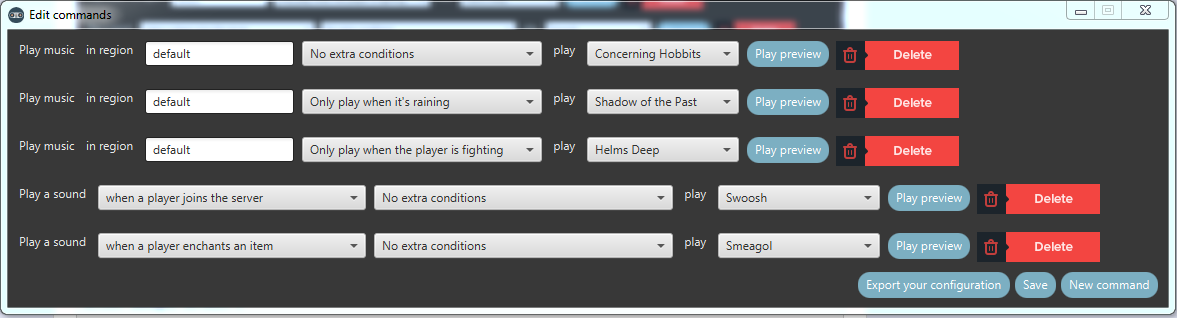
This is the default commands.txt. This is where you configure SoundControl to work exactly how you want it to work.
action join default 8
action damage default 4
action damaged default 5
action enchant default 3
action kill default 2
action death default 1
action leave default 6
region default default 1
region default fight 2
region default rain 3
Each command follows this format: id specifier condition media .
ID can either be region or action. Region plays music in a certain area whereas an action plays a sound effect when something occurs.
Specifier tells SoundControl what you want the command to apply to. If you're using action these are all actions you can use.
damaged - plays to a player when he/she is damaged by another player
damage - plays to a player when he/she damages another player
death - plays to a player when he/she dies
kill - plays to a player when he/she kills another player
enchant - plays to a player when he/she enchants something
leave - plays to a player when he/she leaves the server
join - plays to a player when he/she joins the server
join_region - plays to a player when he/she enters a region
leave_region - plays to a player when he/she leaves a region
cmd - plays when a player executes a command
message_receive - plays when a player receives a messages via chat
message_sent - plays when a player sends a message via chat
For region the specifier can either be a region name or "default". Default means it will apply to all regions that do not have something set.
The condition is used to further specify when to play a sound or music. The possible conditions are:
default - applies to all situations
rain - applies to when it is raining where the player is located
fight - applies to when a player is in a fight
region:<region> - applies only in a certain region
The media is just a number to specify which link in music.txt and effects.txt to play for each command. region command take from music.txt and action commands take from effects.txt
This is a lot to digest so let me break down two examples:
action death region:test 8In this example effect number 8 will be played to a player when he/she dies if the player is in region "test".
region default rain 3In this example music track 3 will play whenever a player is within any region and it is raining.
Music.txt and effects.txt follow the exact same template as each other. Here is the default effects.txt
1 http://www.freesfx.co.uk/rx2/mp3s/11/12990_1454331684.mp3 john cena
2 http://www.freesfx.co.uk/rx2/mp3s/2/1699_1263260432.mp3 airplane ding
3 http://www.freesfx.co.uk/rx2/mp3s/5/5599_1335272404.mp3 click sound
4 http://www.freesfx.co.uk/rx2/mp3s/3/3590_1329340514.mp3 bubble
5 http://www.freesfx.co.uk/rx2/mp3s/2/1871_1272479313.mp3 blood splat
6 http://www.freesfx.co.uk/rx2/mp3s/3/3233_1329146192.mp3 missile launch
7 http://www.freesfx.co.uk/rx2/mp3s/9/10332_1370004571.mp3 shaving cream
8 http://www.freesfx.co.uk/rx2/mp3s/10/12053_1417565729.mp3 laser cannon
You may add comments next to each to keep track of what they are
This has been a side project for a while now please message me with anything you need.
Before leaving a review read this

If the above doesn't work, send to my paypal [email protected]
View the donor list here!
Similar projects
Plugin →Let Me Despawn
Improves performance by tweaking mob despawn rules. Say bye to pesky unintentional persistent mobs.
26.2MSueta
JourneyMap
Real-time map used for mapping in-game or your browser as you explore.
14.7MSueta
Emotecraft
Create your own emotes in Minecraft.
7.9MSueta
Simple Tpa
A simple tpa plugin which sends requests
5.4MSueta
Common Network
Forge and Fabric Unified Networking Solution
4.7MSueta
Set Home
A lightweight plugin for players to set their homes.
3.8MSueta