
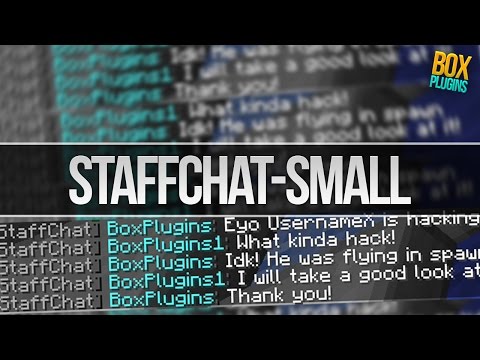
StaffChat-Small
V.3.9This is an easy staffchat plugin to communicate with other staffs, helpers, admins and mods!!
StaffChat-Small
This is an easy staffchat plugin with very much options.
Features:
- 5 different chats
- Customizable
- Mute chats
- Easy to use
- Lightweight
- Sound on message
- 1.8, 1.9, 1.10, 1.11, 1.12, 1.13 and 1.14 support
- Use colorcodes in your messages
Commands
Click here to show the commands
/Staff (message)
Send a message to all players with the right permissions.
/S (message)
Send a message to all players with the right permissions.
/Helper (message)
Send a message to all players with the right permissions.
/H (message)
Send a message to all players with the right permissions.
/Admin (message)
Send a message to all players with the right permissions.
/A (message)
Send a message to all players with the right permissions.
/Moderator (message)
Send a message to all players with the right permissions.
/Mod (message)
Send a message to all players with the right permissions.
/All (message)
Send a message to all players with any StaffChat permission.
/Staffreload
Reloads the Config.yml
/Srl
Reloads the Config.yml
/StaffChat
Get info about the plugin
/Staff (un)mute
Mute or unmute the Staffchat
/Helper (un)mute
Mute or unmute the Helperchat
/Moderator (un)mute
Mute or unmute the Moderatorchat
/Admin (un)mute
Mute or unmute the Adminchat
/Staffchat (un)mute
Mute or unmute all chats (except 'all')
/Staffchat (un)mutesound
Mute or unmute the sound (per person)
Permissions
Click here to show the permissions
StaffChat.staff
Permission to use /staff, /s, /staffreload and /staffchat
StaffChat.helper
Permission to use /helper, /h and /staffchat
StaffChat.admin
Permission to use /admin, /a and /staffchat
StaffChat.moderator
Permission to use /moderator, /mod and /staffchat
StaffChat.all
Permission to use /all
StaffChat.*
Permission to use all the StaffChat commands
Tutorial V.2.7
Upcoming Features
- Command to let you stay in the staff/helper/admin/mod chat
- Essentials prefixes and nickname support
- Bungeecord support
- More
Default Config.yml
Click here to see the default Config.yml
# Use %player% for the command sender and %chat% for the chat
Staff: '&8[&fStaffChat&8] &b&l%player%&8:&f'
Helper: '&8[&aHelperChat&8] &7%player%&8:&f'
Admin: '&8[&cAdminChat&8] &4%player%&8:&f'
Moderator: '&8[&9ModeratorChat&8] &6%player%&8:&f'
All: '&8[&4All&8] &c%player%&8:&f'
NoPerms: '&cYou don''t have permission to use this command!'
Reload: '&aThe config reloaded succesfully!'
Mute: '&aYou have muted the %chat%!'
Unmute: '&aYou have unmuted the %chat%!'
Already_Muted: '&cYou have already muted the %chat%!'
Not_Muted: '&cYou haven''t muted the %chat%!'
Mute_Everything: '&aYou have muted all chats!'
Unmute_Everything: '&aYou have unmuted all chats!'
Already_Muted_Everything: '&cYou have already muted all chats!'
Not_Muted_Everything: '&cYou haven''t muted all chats!'
Mute_Sound: '&aYou have muted the sound!'
Unmute_Sound: '&aYou have unmuted the sound!'
Already_Muted_Sound: '&cYou have already muted the sound!'
Not_Muted_Sound: '&cYou haven''t muted the sound!'
Muted: '&cYou have muted the %chat%, so you can''t say something there! Use /staff
  unmute to unmute yourself.'
Muted_Everything: '&cYou have muted all the chats, so you can''t say something here!
  Use /staffchat unmute to unmute yourself'
Sound_on_message:
  enabled: true
If you have any questions or suggestions send me a message on discord: Kboutr#4309
If you like this plugin leave a review and a like :)
Similar projects
Plugin →Let Me Despawn
Improves performance by tweaking mob despawn rules. Say bye to pesky unintentional persistent mobs.
25MSueta
JourneyMap
Real-time map used for mapping in-game or your browser as you explore.
14.7MSueta
Emotecraft
Create your own emotes in Minecraft.
7.5MSueta
Simple Tpa
A simple tpa plugin which sends requests
5.4MSueta
Common Network
Forge and Fabric Unified Networking Solution
3.9MSueta
Set Home
A lightweight plugin for players to set their homes.
3.8MSueta