

⛏️ The Bridge [1.8 - 26.2] ⚔️
A fast, lightweight, and fully customizable Hypixel-style The Bridge mini-game plugin for Minecraft Spigot & Paper servers, supporting versions 1.8 all the way up to 26.2!
How The Game Is Played
In The Bridge, players are divided into two teams and battle across a single, narrow bridge suspended between 2 or 4 islands. Each team's objective is to cross the bridge and score points by jumping into the opponent's pit, located on their island. Players can use swords to fight and defend their bridge, while also being able to build or destroy the bridge itself for strategic advantage. The game is fast-paced, requiring teamwork and quick reflexes, and ends when a team successfully scores 5 points. The bridge can be rebuilt, making every round a dynamic challenge.
TEST SERVER: testing.mipcraft.eu (157.90.137.69:22022)

✨ Features
- Multi-Team & Flexible Modes: Supports 2-Team & 4-Team configurations with
1v1,2v2,3v3, and4v4match sizes. - ️ In-Game Hotbar & GUI Setup Editor: Easy visual setup using hotbar wands, hologram location markers, and an interactive status dashboard GUI.
 Cross-Version Performance: Native cross-version NMS abstractions optimized for legacy
1.8servers up to modern26.x.- PlaceholderAPI Integration: Built-in placeholders for player statistics, arena statuses, live player counts, and server stats.
- Modern Config & Localization: Completely customizable chat messages, scoreboards, action bar notifications, countdown titles, and ASCII-styled configuration files.
- Dual Storage Options: Local SQLite/YML file storage or MySQL database connectivity for network setups.
- ️ Built-in Protection & Reset: Automatic arena regeneration, void detection, hunger preservation, and building border constraints.
- Developer API: Custom event hooks (
PlayerKilledInGameEvent,PlayerTriggerScoreEvent) to build custom add-ons on top of the game.
Commands & Permissions
| Command | Permission | Description |
/tb play | TheBridge.play | Opens the GUI match selector menu. |
/tb join <game> | TheBridge.play | Joins a specific game arena directly. |
/tb leave | TheBridge.play | Leaves your current match or lobby. |
/tb list | TheBridge.admin | Displays all configured arenas with live status & player counts. |
/tb create <game> | TheBridge.admin | Creates a new arena and launches the interactive setup editor. |
/tb edit <game> | TheBridge.admin | Opens the hotbar editor and GUI status dashboard for an arena. |
/tb remove <game> | TheBridge.admin | Stops match, removes arena from memory, and deletes its config file. |
/tb reload | TheBridge.admin | Reloads all configuration settings. |
PlaceholderAPI Support
Integrate stats into scoreboards, TAB lists, holographic displays, or server hubs using %thebridge_*% placeholders:
Player Statistics
%thebridge_player_kills%- Total player kills%thebridge_player_wins%- Total player victories%thebridge_player_scores%/%thebridge_player_goals%- Total goals scored
Arena & Server Status
%thebridge_total_players%- Count of players currently playing across all arenas%thebridge_total_games%- Total number of configured arenas%thebridge_arena_status_<arena>%- Live state of<arena>(WAITING,PLAYING,ENDING)%thebridge_arena_players_<arena>%- Current player count in<arena>%thebridge_arena_max_players_<arena>%- Maximum player capacity in<arena>
Quick Setup Guide
- Download TheBridge.jar and place it into your server's
plugins/directory. - Start or reload your server to generate default configurations.
- Run
/tb create <arena_name>to enter interactive setup mode. - Use the hotbar wands to set:
- Lobby Spawn
- The First Team Spawn & Goal Portal...
- Build Boundaries
- Open the Setup Dashboard GUI (Slot 8) to verify all markers display green.
- Click Save & Exit (Slot 9) and your arena is ready for players!
⚠️ Only set one side of the game, the other teams will be setup automatically as the game is symmetrical!
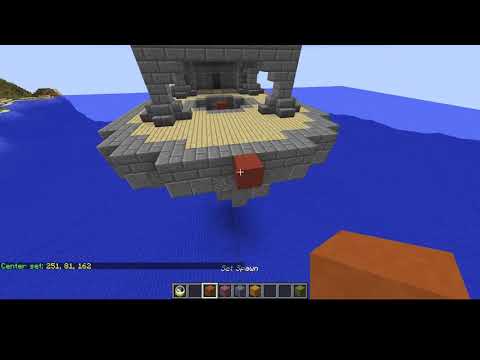
Setup videos:

⚙️ Configuration Preview
# +-------------------------------------------------------------------+
# |                     T H E   B R I D G E                           |
# |                 Premium Minecraft Mini-Game Config                |
# +-------------------------------------------------------------------+

database:
   enabled: true
   use_local_file: true

Waiting_In_Lobby: 30
Waiting_For_Next_Round: 5
Winning_Score: 5
Arrow_refresh: 3

formats:
   game:
      starting_title: '&aGame starts in'
      starting_subtitle: '<time> seconds!'
      fight: '&aGo!'
      team_wins: '<team> team wins!'
      player_scores: '<player> scored!'
Other plugins:


Join Discord: https://discord.gg/2dcXEtP
Similar projects
Plugin →Let Me Despawn
Improves performance by tweaking mob despawn rules. Say bye to pesky unintentional persistent mobs.
26.2MSueta
JourneyMap
Real-time map used for mapping in-game or your browser as you explore.
14.7MSueta
Emotecraft
Create your own emotes in Minecraft.
7.9MSueta
Simple Tpa
A simple tpa plugin which sends requests
5.4MSueta
Common Network
Forge and Fabric Unified Networking Solution
4.7MSueta
Set Home
A lightweight plugin for players to set their homes.
3.8MSueta