
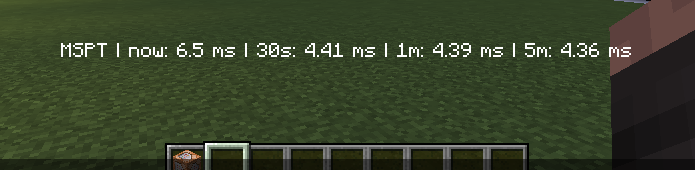

Tiny plugin that allows your to monitor your server's MSPT (milliseconds per tick). It is extremely lightweight and will not affect your server's performance in any way.
Donate if this plugin was/is useful to you: https://www.paypal.me/langejulian
Usage
- Use the command "/tickmonitor", the tab-completions show you all options.
- Aliases for the command: "/tm" and "/mspt"
- Required permission "tickmonitor.admin"
- Use "/tickmonitor monitor" to show the MSPT in your action bar
- Use "/tickmonitor getlatest" to show the latest MSPT in your chat

API Usage
- The API fires the event "MonitoringCycleCompleteEvent"
- Event cannot be cancelled
- It passes the time frame that has elapsed (enum Timeframe) and a set of doubles that are the observed milliseconds per tick for the event's timeframe
- event.getTimeframe() -> MonitoringCycleCompleteEvent.Timeframe
- event.getData() -> List<Double>
Installation
- This plugin requires PaperSpigot!
- To activate the plugin, put it on your server and restart it.
- To deactivate it, remove it from the server and restart it.
- The plugin does not create a data folder and does not have any config options
Compability
- This plugin was desgined for 1.14 and 1.15 builds.
- It is likely to, but not guaranteed, to work on older versions also (feel free to test and report)
How to read the values
MSPT (milliseconds per tick)
- There are supposed to be 20 game ticks per second - that's how the minecraft server works.
- A second has 1000 milliseconds.
- 1000 ms / 20 ticks = 50 ms.
- Thus, if your MSPT exceeds 50, your server will lose TPS (bad)
- The smaller your MSPT, the better.
Similar projects
Plugin →Let Me Despawn
Improves performance by tweaking mob despawn rules. Say bye to pesky unintentional persistent mobs.
25MSueta
JourneyMap
Real-time map used for mapping in-game or your browser as you explore.
14.7MSueta
Emotecraft
Create your own emotes in Minecraft.
7.5MSueta
Simple Tpa
A simple tpa plugin which sends requests
5.4MSueta
Common Network
Forge and Fabric Unified Networking Solution
3.9MSueta
Set Home
A lightweight plugin for players to set their homes.
3.8MSueta