
TrickyShops [BSP] - Makes creating shops way faster
v1.0.1This BossShopPro Addon makes creating shops way faster by simple tricks.
TrickyShops
This BossShopPro Addon makes creating shops way faster by simple tricks.
Many of your shopitems have a similar structure but you need to write the whole structure for every single one? Not anymore!
TrickyShops allows you to create predefined layouts of shopitems that include your own variables. Now all you need to do to create a new shopitem is select the right layout and enter the values of the variables.
Features
- Helps you save lots of time
- You can create infinite own shopitem layouts
- Create complex shopitems with minimum effort and configuration after setting up the corresponding layouts
- Simple and basic system
- Supports calculations
Sounds complicated? Well, it works really quick once you understand it. I'll show you an example:
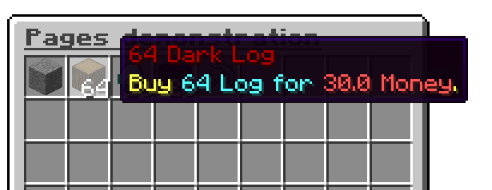
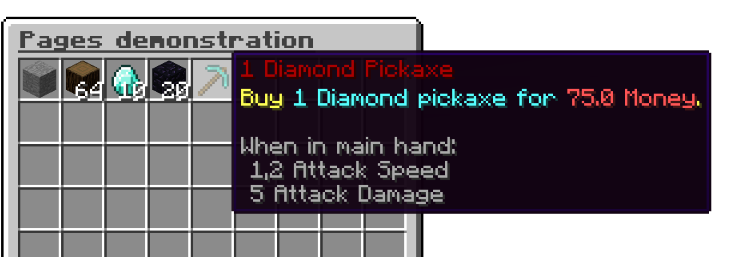
These items were created with following configuration:
exampleitem1:
    Layout: layout_simple
    Item: 'LOG:64:1'
    Price: '30'
    Name: 'Dark Log'
  exampleitem4:
    Layout: layout_simple
    Item: 'DIAMOND_PICKAXE:1:0'
    Price: '75'
    Name: 'Diamond Pickaxe'
Savage, right?
Both shopitems use the same layout that has been predefined once:
layout_simple:
  input:
    Item: '[type]:[amount]:[durability]'
    Price: '[buyprice]'
    Name: '[name]'
  output:
    MenuItem:
    - 'type:[type]'
    - 'amount:[amount]'
    - 'name:&4[amount] [name]'
    - 'lore:&eBuy &b%reward% for &c%price%&e.'
    - 'durability:[durability]'
    InventoryLocation: 0
    ExtraPermission: ''
    PriceType: money
    Price: '[buyprice]'
    RewardType: item
    Reward:
    - - 'type:[type]'
      - 'amount:[amount]'
      - 'durability:[durability]'
    Message: '&eYou bought %itemname% for %price%.'
This might look complicated first, but again it can save tons of time.
Every layout consists of two parts: input and output.
Let's start by looking at the input:
input:
    Item: '[type]:[amount]:[durability]'
    Price: '[buyprice]'
    Name: '[name]'
Here you can create your own paths with the names that you want them to give. You can assign every path a set of own variables that you separate using ':'. You can choose any variable name that you want (Needs to be inside brackets). These are the variables that you later need to enter in order to create your shopitems.
Now all which is left is the output:
output:
    MenuItem:
    - 'type:[type]'
    - 'amount:[amount]'
    - 'name:&4[amount] [name]'
    - 'lore:&eBuy &b%reward% for &c%price%&e.'
    - 'durability:[durability]'
    InventoryLocation: 0
    ExtraPermission: ''
    PriceType: money
    Price: '[buyprice]'
    RewardType: item
    Reward:
    - - 'type:[type]'
      - 'amount:[amount]'
      - 'durability:[durability]'
    Message: '&eYou bought %itemname% for %price%.'
Here you set up a shopitem as you are used to, except there is one tiny difference: You can use all variables that you have created in the input section to fill in specific information. For example if you want every item displayname to have the same style but include the name of the item, simply create a '[name]' variable in the input section and use it here.
The best way to learn this system is by doing some testing and trying it out ;-)
Advanced calculation feature
Optionally you can add one list of variables which will be generated using existing variables and some maths.
Here is an example:
input:
    Item: '[type]:[amount]:[durability]'
    Worth: '[worth]'
    Name: '[name]'
    rest:
    - '[buyprice]=[worth]*1.2'
    - '[sellprice]=[worth]*0.6'
In this case in order to set up a shopitem you just need to enter one worth value. However the layout can work with [buyprice] and the [sellprice] variable.
Similar projects
Plugin →Let Me Despawn
Improves performance by tweaking mob despawn rules. Say bye to pesky unintentional persistent mobs.
25MSueta
JourneyMap
Real-time map used for mapping in-game or your browser as you explore.
14.7MSueta
Emotecraft
Create your own emotes in Minecraft.
7.5MSueta
Simple Tpa
A simple tpa plugin which sends requests
5.4MSueta
Common Network
Forge and Fabric Unified Networking Solution
3.9MSueta
Set Home
A lightweight plugin for players to set their homes.
3.8MSueta