
TWINGS | a simple yet powerful particle cosmetics Spigot plu
3.0.1While its main purpose is just to give you a couple of fancy wings on your back, there's much more!
- TWINGS -
Create your own particle-wings in Minecraft 1.20.5+
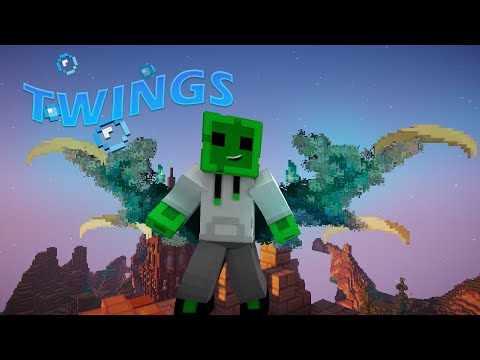
TWINGS is a simple yet powerful particle cosmetics Spigot plugin. While its main purpose is just to give you a couple of fancy wings on your back, there's much more possibilities for your customizations, including but not limited to:
* NEW: Design wings in your browser with a live 3D preview — jasonholweg.de/twings
* NEW: Community Library — share & install wings with one command: /twings install <code>
* Create custom Wings with patterns (colors + real Minecraft particles)!
* GUI with all created Wings, sorted into categories
* Credits to the creator of each Wings
* Permission for each couple of Wings
* Easy API for developers
* Animated Wings with adjustable animation speed & particle rate
* Equip multiple Particles at the time
* Give players wings until death, or for a specific time
* 6 preset wings included out of the box
* Discord for help: https://discord.gg/N6Ybpr6QYQ
TWINGS 3.0 — the big rewrite
Version 3.0 is a full rewrite for Minecraft 1.20.5 – 26.2 (Java 21+). It fixes the performance issues of the older versions (no more ping lag / TPS drop over time), keeps all your existing wings and player data working, and adds the browser Wing Designer and the community Library. Older Minecraft versions (1.16 – 1.20.4) can keep using the previous releases.
- COMMANDS-
Commands
/twings - opens the GUI.
/twings list - gives you a list of all twings.
/twings equip [twing] - equips a specific twing.
/twings unequip - unequips any twings.
/twings add [twing] - equips another specific twing.
/twings give [onlineplayername] [twing] [time] - gives a user a specific twing for a specific time or "untildeath".
/twings install [codeid] - installs a wing from the online Library (jasonholweg.de/twings).
/twings import - installs a wing file or image straight from a link. /twings preview - opens a GUI with all twings to set a preview on your location. /twings create - opens a GUI with all pictures in the pictures folder; click one to turn the picture into a twing file! Max is ~70x70 pixels. /twings reload - reloads configs, language and all wing files (works from the console too).
- WING DESIGNER & LIBRARY -
Design in your browser


- GENERAL CONFIG -
config.yml
Prefix: '&e&lTWings'
max equipped twings: 2
Wings:
  showwithperms: false
  updaterate: 3
Menu:
  title: '%prefix% &9Choose your Wings!'
  symbol: ⏹
  creator: '&c&lCreator:&f %creator%'
  permissions: '&7unlocked: [%perms%&7]'
  lore:
    pattern: true
    creator: true
    permissions: true
    action1: true
    action2: true
haspermission: '&aYES'
nopermission: '&cNO'
gui:
  arrowback: '&c<- back'
  arrownext: '&anext ->'
  unequip: '&4unequip particles'
hide on spectator: true
hide on invis: true
rotation speed: 0.2
# Where /twings install fetches wings from (the public Library by default)
library:
  url: 'https://jasonholweg.de/twings'
- VAMPIRE WINGS CONFIG EXAMPLE -
vampire.yml
# Here you can create your own ParticleCodes!
# You can use them in the Pattern.
# x presents AIR, DON'T use X as a ParticleCode.
# For colored Dust use e.g. DUST:(255,255,255) — old files using REDSTONE still work, it is translated automatically.
# You can also adjust size and speed of particles:
#   normal particles (speed):   ParticleCode: PARTICLE:SPEED
#   dust particles (size):      ParticleCode: DUST:(R,G,B):SIZE
# New in 3.0 (optional, per wing):
#   updaterate: 3        # ticks between redraws (lower = smoother/denser, higher = pulsing)
#   animationspeed: 1.0  # flap / rotation speed (1.0 = default)
Particles:
  B: DUST:(24,24,24)
  G: DUST:(128,128,128)
  S: DUST:(48,48,48)
Item:
  Material: MAP
  Name: '&cVampire wings'
#if you don't want permission delete this modifier!
permission: twings.vampire
category: wings
creator: PixelStrace
DegreeAddition: 10
SneakingDegreeAddition: 20
ShowWhenRunning: false
tilt: 0
rotation: 0
moveback: 0
moveup: 0.3
mirrow: true
Animated: false
spacing: 0.07
updaterate: 3
animationspeed: 1.0
exclude:
- x
pattern:
- B,B,x,x,x,x,x,x,x,x,x,x
- x,B,B,B,x,x,x,x,x,x,x,x
- x,x,B,S,B,B,x,x,x,x,x,x
- x,x,B,G,S,S,B,B,x,x,x,x
- x,x,x,B,G,G,S,S,B,x,x,x
- x,x,x,B,G,G,G,G,S,B,x,x
- x,x,B,B,G,G,G,G,G,S,B,x
- x,B,B,B,B,B,B,B,B,S,B,x
- x,x,B,G,G,G,G,G,G,G,S,B
- x,x,x,B,G,G,G,G,G,G,S,B
- x,x,x,B,G,G,G,G,G,S,B,x
- x,x,B,B,B,G,G,G,G,S,B,x
- x,x,x,x,x,B,B,G,S,B,x,x
- x,x,x,x,x,x,x,B,S,B,B,x
- x,x,x,x,x,x,x,B,S,S,B,x
- x,x,x,x,x,x,x,x,B,S,S,B
- x,x,x,x,x,x,x,x,x,B,B,xlang.yml
show messages: true
equip: '%prefix% &9you have equipped %WingName%!'
unequip: '%prefix% &9you have unequipped %WingName%!'
preview set: '%prefix% &aPreview Location set.'
preview removed: '%prefix% &cPreview removed.'
editmode: '%prefix% &c%WingName% is now in edit mode.'
wing not found: '%prefix% &c%WingName% not found. All Particles: &d/twings list'
menu:
  editleft: '&cLeft click to set the edit status'
  editright: '&cRight click to remove the edit status'
list: '%prefix% &7List of all Particles:'
bulletpoint: ' &7- &f%WingName%'
noperms: '%prefix% &cSorry, you don''t have the permission to use that.'
no such command: '%prefix% &cSorry, there is no such command.'
wings given: '%prefix% &7You now have wings for &c%time%&7.'
wings gone: '%prefix% &cYour wings are now gone.'
player not found: '%prefix% &cthe player wasn''t found.'
rightclick to unequip: '%prefix% &cRightclick to unequip!'
leftclick to equip: '%prefix% &bLeftclick to equip!'
shiftleft to add: '%prefix% &bLeftclick to add to other equipped.'
shiftright to unequip all: '%prefix% &cRightclick to unequip all.'
already equipped: '%prefix% &cYou already equipped these Particles.'
max twings: '%prefix% &cYou can''t equip more then %max% Particles!'lang.yml (CHINESE zh_tw)
show messages: true
equip: '%prefix% &9你已經套用 %WingName%!'
unequip: '%prefix% &9你沒有套用 %WingName%!'
preview set: '%prefix% &a預覽位置集.'
preview removed: '%prefix% &c預覽已移除.'
editmode: '%prefix% &c%WingName% 現在處於編輯模式.'
wing not found: '%prefix% &c%WingName% 未找到.所有粒子:&d/twings list'
menu:
  editleft: '&c左鍵單擊設置編輯狀態'
  editright: '&c右鍵刪除編輯狀態'
list: '%prefix% &7所有粒子列表:'
bulletpoint: ' &7- &f%WingName%'
noperms: '%prefix% &c你沒有全縣使用!'
no such command: '%prefix% &c無效指令.'
wings given: '%prefix% &7你現在有翅膀 &c%time%&7.'
wings gone: '%prefix% &c你的翅膀現在消失了.'
player not found: '%prefix% &c找不到玩家.'
rightclick to unequip: '%prefix% &c右鍵解除套用!'
leftclick to equip: '%prefix% &b左鍵套用!'
shiftleft to add: '%prefix% &bShift和左鍵單擊以添加到其他套用.'
shiftright to unequip all: '%prefix% &cShift和右鍵單擊以解除所有套用.'
already equipped: '%prefix% &c你已經套用了這些粒子.'
max twings: '%prefix% &c你不能裝備超過 %max% 的粒子!'
- CategoryGUI config example -
CategoryGUI.yml
enabled: true
title: '&bChoose the category!'
rows: 5
category:
  wings:
    displayname: '&d&lWINGS'
    lore:
    - '&8Here you can find all wing particles!'
    - '&e&oLeftclick to open!'
    material: ELYTRA
    glow: false
    slot: 13
  logos:
    displayname: '&c&lLOGOS'
    lore:
    - '&7Here you can find all logo particles!'
    - '&7Show your site..'
    - '&e&oLeftclick to open!'
    material: ITEM_FRAME
    glow: false
    slot: 20
  flags:
    displayname: '&a&lFlags'
    lore:
    - '&7Here you can find all flag particles!'
    - '&7Show your nationality'
    - '&e&oLeftclick to open!'
    material: LEATHER
    glow: true
    slot: 24
- TUTORIALS -
How do i create a new TWING:
https://jasonholweg.de/twings
- PLUGIN VIDEOS -
Creator: Produktecheck
- LAST WORDS -
I hope you like my Plugin!
Feel free to leave a review :)
If you have any trouble getting started to create your own Wings feel free to contact me <3
My Discord: https://discord.gg/N6Ybpr6QYQ
Similar projects
Plugin →Let Me Despawn
Improves performance by tweaking mob despawn rules. Say bye to pesky unintentional persistent mobs.
26.2MSueta
JourneyMap
Real-time map used for mapping in-game or your browser as you explore.
14.7MSueta
Emotecraft
Create your own emotes in Minecraft.
7.9MSueta
Simple Tpa
A simple tpa plugin which sends requests
5.4MSueta
Common Network
Forge and Fabric Unified Networking Solution
4.7MSueta
Set Home
A lightweight plugin for players to set their homes.
3.8MSueta