

Two Factor Authentication is a free way to protect your players from hackers.
QR-Code

Enable Message

Help Message


qr-image-keyId: MinecraftServer
settings:
  deny-commands: true
  deny-movement: true
  deny-interaction: true
  deny-damage: true
  give-qr-map: true
storage:
  # You can choose between YML or MYSQL
  storage-type: YML
  connection-details:
    host: 0.0.0.0
    port: 3306
    username: username
    password: password
    # Insert your details for MYSQL here if you have the storage-type: MYSQL
    mysql:
      database: twofactor
      table: twofactorusers

# You can reload the messages in-game with the command '/twofactor reload'
messages:
  invalid-code: '&cYou have entered an invalid code! &7*Note: A code will only contain numbers'
  valid-code: '&a&lAccess granted! &7Your access has been granted to our server!'
  twofactor-help: |
    &a&lTwo Factor Authentication Help
    &7- /twofactor enable
  twofactor-enabled: |
    &7Your &6Google Authentication Key &7is &a{key}
    &7Please enter this key in your &6Google Authenticator App&7 or
    &7you can scan the QR-Code on your screen!
  twofactor-join: |
    &7Please open the &6Google Authenticator App &7and provide the six digit code.
     &7*Note: Type the six digit code in the chat
  twofactor-disabled: '&cYou have successfully disabned 2FA! &7*Note: Your account is no longer secure'
  twofactor-already-secured: '&aYou account has already been secured!'
  twofactor-no-permission: '&cYou are not permitted to use this command.'
  admin:
    invalid-player: '&cWe can not find the player {player} in our database!'
    player-reset-success: '&cYou have successfully removed the 2FA code for {player}!'
    player-reset-nokey: '&cYou can not remove the code for {player}, because this player does not have a key'
    plugin-reload: '&aYou have successfully reloaded the configuration file for &lTwo Factor Authentication&a.'
qr-image-keyId
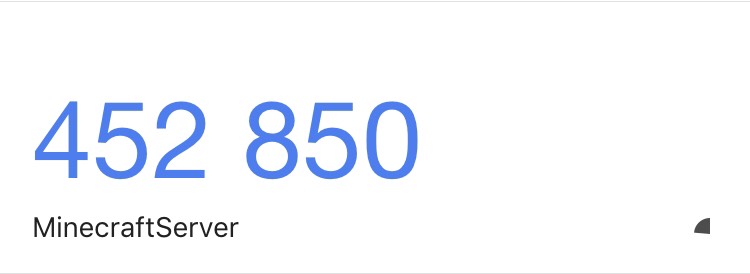
For example if your qr-image-keyId in the config file is MinecraftServer the text in the app will change to MinecraftServer.

Off course you need permissions to use the plugin. You can find all the permissions here
twofactor.use
- You need this permission to get protected at login.
twofactor.commands.use
- You need this permission to enable 2FA with /2fa enable
Similar projects
Plugin →Let Me Despawn
Improves performance by tweaking mob despawn rules. Say bye to pesky unintentional persistent mobs.
25MSueta
JourneyMap
Real-time map used for mapping in-game or your browser as you explore.
14.7MSueta
Emotecraft
Create your own emotes in Minecraft.
7.5MSueta
Simple Tpa
A simple tpa plugin which sends requests
5.4MSueta
Common Network
Forge and Fabric Unified Networking Solution
3.9MSueta
Set Home
A lightweight plugin for players to set their homes.
3.8MSueta