
WebReporter
0.1.1_BETA (Java 8 build)A professional reports interface for your users & mods | Opened for beta testing: expect issues!
While I have provided a binary download, I highly recommend you build from source. This will ensure better compatibility.
Seeking testers: This plugin is not production ready - we are posting this in search of admins willing to test this on their server. As it only gathers information and doesn't modify the game, it should be incapable of causing corruption etc.
Please understand this plugin is in early development and has been posted for TESTING purposes. Currently the plugin works perfectly on our servers but we cannot say whether it will work elsewhere. If you want to check for us and let us know your specs, we would be incredibly appreciative!
Tested environments:
Ubuntu 18 - Java 11 - MariaDB - Apache2 - works perfectlyCurrently don't expect it to work unless you are using:
Java 10 or above (I'll upload a java 8 version shortly)
PaperMC Server (tested on git-Paper-564 1.13.2)
MariaDB MySQL (The only driver provided currently)
Apache 2 external webserver (or compatible)
With that out of the way, I'd like to introduce my project, WebReporter!
WebReporter was born out of frustration with the user experience of currently available reporting plugins. While I have not used all of them, the reports plugins I've tested are unsatisfactory due to complex command syntax, lack of documentation or janky interfaces.
WebReporter is inspired by plugins like LuckPerms which has an awesome web interface. In addition, the interface was designed to be familiar to gamers used to reporting systems in AAA games. Almost always those open a browser tab for ease of entering the data.
I intend to add more customization to branding and appearance.
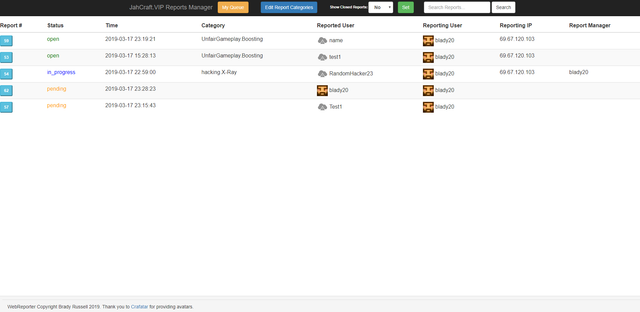
Screenshots:

See a quick demo of WebReporter here:
Usage:
Players:
/report <username>     (Creates a new report regarding the specified player.)

(no permission nodes)

Moderators:
/reports  (Opens the moderator report interface.)
/tpreport reporter/reported/back>  (Teleport to the specified report location, either reporter, reported player or back to where you started.)

(webreporter.manager)
Installation
Step 1. Setting up the database:
Import the .SQL file using your utility of choice. Detailed instructions can be found in the web interface setup guide.
Step 2. Setting up the plugin:
Install the WebReporter.jar into your plugins folder. Restart the server to generate a new config file, the stop it once more. Note that it will cause errors if left running because you have yet to provide your database credentials.
Edit WebReporter/config.yml like so:
Step 3. Configuration:
database_host: 'localhost'
database_name: 'webreporter'
database_username: 'user'
database_password: 'pass'
# this should be formatted like https://yoursite.tld/report.php?id= so the report key can be appended to the end
reports_link: 'https://yoursite.tld/report.php?id='
Now start your server again. If everything worked properly, you should be able to use /report in game and be given a random report code.
Step 4. Setting up the Web Interface:
To set up the web interface please see the instructions here:
https://github.com/bradyrussell/WebReporterPHP/blob/master/README.md
Report Issues / Bugs / Feature Requests on the Github please!
Report Plugin Issues
Report Web Interface Issues
Tried out webreporter? Let us know your specs and if you encountered any difficulty!
Similar projects
Plugin →Let Me Despawn
Improves performance by tweaking mob despawn rules. Say bye to pesky unintentional persistent mobs.
25MSueta
JourneyMap
Real-time map used for mapping in-game or your browser as you explore.
14.7MSueta
Emotecraft
Create your own emotes in Minecraft.
7.5MSueta
Simple Tpa
A simple tpa plugin which sends requests
5.4MSueta
Common Network
Forge and Fabric Unified Networking Solution
3.9MSueta
Set Home
A lightweight plugin for players to set their homes.
3.8MSueta