
WorldGuard-Translator
1.1.3Translate & Customize WorldGuard messages via config, no JAR modifying required
- Tested MC versions
- 1.16, 1.17, 1.18, 1.19, 1.20, 1.21, 26.1, 26.2
WorldGuard-Translator
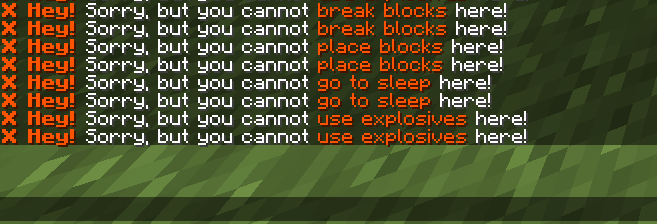
Forget about the hassle of translating WorldGuard. With this plugin, you can easily translate and customize messages from the WorldGuard plugin without modifying the JAR file, for example, using InJarTranslator.
🌴 Features
- High performance and lightweight
- MiniMessage formatting support
- Modify messages directly in-game
- Translation of English action keys (e.g.,
break that block) to your own language - Compatibility with any WorldGuard version
- Automatic downloading of pre-made translations
⠀
🚀 How does the plugin work?
WorldGuard-Translator modifies WorldGuard's code directly in RAM during server startup or plugin reload.
The plugin intercepts the original deny messages (deny-message) and dynamically replaces English technical strings with your translated equivalents.
⠀
✍️ Configurations
config.yml
# Pre-made WorldGuard translations.
# Downloaded from https://github.com/SuperCHIROK1/WorldGuard-Translator/tree/main/translations
# All you need to do is customize the message style to fit your server.
# You can add your own languages. Create a file inside "translations" folder and name it in <language>.yml format.
#
# Check for the latest translations here: https://github.com/SuperCHIROK1/WorldGuard-Translator/tree/main/translations
# Languages available at the time of the plugin build:
#: English (en)
#: Russian (ru)
#: French (fr) - By @git-jamesfrench
lang: en
# Prefix for WorldGuard-Translator plugin messages.
# Used in local messages, replaced via %prefix%
prefix: "bafb6&l[WG-Translator]&f"
# Text formatting serializer.
#
#: LEGACY_AMPERSAND - Traditional legacy color codes (e.g., &c, &l)
#: MINI_MESSAGE - Modern MiniMessage formatting (Paper 1.18+)
# Learn more about formatting here: https://docs.papermc.io/adventure/minimessage/format/
serializer: LEGACY_AMPERSAND
# Check for WorldGuard-Translator plugin updates.
# If an update is available, the plugin will notify administrators in the console and chat.
check_updates: true
# Permission settings.
permissions:
admin_command: "wgtranslator.admin"
update_log: "wgtranslator.update"
Example of localization file (en.yml)
# Deny message template.
# %what% is automatically replaced with the translated string from the "components" section.
deny_message: "&#ff5400&l❌ Hey! &fSorry, but you cannot &#ff5400%what% &fhere!"
# Translations of specific actions.
# Inserted instead of %what% in deny_message.
# You can add your own translations using /wgt component add <key>;<value>
components:
# Block place
"place that block": "place blocks"
"place fire": "ignite the ground"
"use frostwalker": "use Frost Walker"
# Block break
"break that block": "break blocks"
"use dynamite": "use dynamite"
# Block / entity interact
"use that": "use this"
"open that": "open this"
"sleep": "go to sleep"
"use anchors": "use respawn anchor"
"use explosives": "use explosives"
# Entity spawn / drop
"place things": "place items"
"place vehicles": "place vehicles"
"drop items": "drop items"
"drop XP": "drop XP"
"use lingering potions": "use lingering potions"
# Entity destroy / pickup
"break things": "break items"
"break vehicles": "break vehicles"
"pick up items": "pick up items"
# Entity damage / mount
"change that": "modify this"
"ride that": "ride this"
"hit that": "attack this"
"damage that": "damage this"
"harm that": "harm this"
"PvP": "fight players"
messages:
reloaded: "%prefix% Fe000Plugin successfully reloaded! &#e2eafcNew messages/translations have been applied to WorldGuard. &7(Time: %s ms.)"
deny_message:
installed: "%prefix% Fe000Successfully set deny_message!"
installed_temp: "%prefix% Fe000Successfully set temporary deny_message &7(lasts until server or plugin restart)"
component:
added: "%prefix% Fe000Successfully added translation: bafb6%s &#a1a8b8-> bafb6%s"
usage: "%prefix% &#e2eafcPlease use the format bafb6<key>;<translation>&#e2eafc. Example: bafb6break that block;break blocks"
list:
header: "&#a1a8b8----- bafb6&lWG-T : Components &#a1a8b8-----\n"
# {0} - key | {1} - translation
format: "&#a1a8b8• bafb6{0} &#a1a8b8-> &#e2eafc{1}"
help: |-
&8----- &3&lWorldGuard Translator &8-----
&8• &e/%cmd% &6<reload | restart> &7- &#e2eafcReload the plugin.
&8• &e/%cmd% &6component <add | set | list> &7- &#e2eafcManage translations.
&8• &e/%cmd% &6denyMessage <set | setTemp> &7- &#e2eafcSet deny_message.
⠀
🖥️ Commands & Permissions
To use any of the commands listed below, you must have the
wgtranslator.adminpermission (or the custom one you specified in the configuration file).
| Command | Arguments | Description |
|---|---|---|
/wgt | reload / restart / r | Reloads the plugin configuration completely |
/wgt | help | Displays the help menu with available commands |
/wgt component | add / set <key>;<value> | Adds or updates a translation for a specific action |
/wgt component | list | Lists all currently translated strings in chat |
/wgt denyMessage | set <message> | Sets the global denyMessage template |
/wgt denyMessage | setTemp <message> | Sets a temporary denyMessage until the next server/plugin restart |
⠀
❤️ Support the Project:
- Leave a ⭐ Star on our GitHub Repository.
 Join our Discord Server - feel free to submit your own translations or ask for help!
⠀
⚠️ Found a bug or need assistance?
Join our Discord server!
Here you can ask questions, report bugs, suggest new ideas, or submit your own translations.
Similar projects
Plugin →VeinMiner
Mine the whole vein on mining a single ore/block. Make the tedious mining experience to something satisfying and fun! FTB Ultimine alternative
99.3MSueta
Simple Voice Chat
A working voice chat in Minecraft!
76.8MSueta
Chunky
Pre-generates chunks, quickly and efficiently
18.4MSueta
VeinMiner Enchantment
Veinminer Addon - Adds vineminer enchantment to enchanting tables. Only tools with the enchantment can veinmine
18MSueta
JourneyMap
Real-time map used for mapping in-game or your browser as you explore.
14.7MSueta
WorldEdit
A Minecraft Map Editor... that runs in-game! With selections, schematics, copy and paste, brushes, and scripting. Use it in creative, or use it temporarily in survival.
11.6MSueta