
xItemLoreChat – Display Item Details in Chat with Hover Effe
1.0A Minecraft plugin that allows players to display item details in chat with hover events.
xItemLoreChat – Display Item Details in Chat with Hover Effects!
A Minecraft plugin that allows players to display item details in chat with hover events.
Supported Minecraft Versions
 1.20.1 – 1.21.4 (All versions between 1.20.1 and 1.21.4 are supported)
Features
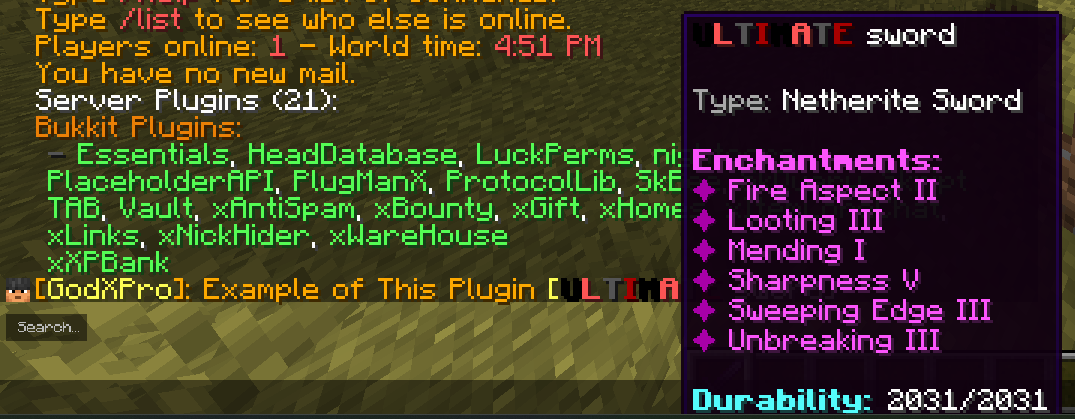
 Display item details in chat by typing %item%
Shows item name, enchantments, and lore on hover
Customizable chat format via config
Permission-based access control
Installation
 Download the latest xItemLoreChat.jar
 Place the file in your server’s /plugins/ folder
 Restart your server
 Customize settings in plugins/xItemLoreChat/config.yml
Configuration (config.yml)
# Message shown when a player doesn't hold an item
no-item-message: "&cYou must hold an item to display its details!"
Chat message format
Available placeholders:
%player% - Player name
%item% - The item display
message-format: "&6[&e%player%&6]: %item%"
Permissions
- xitemlorechat.use → Allows players to use %item% in chat (default: true)
- xitemlorechat.admin → Allows access to admin commands (default: OP)
Commands
/itemlorechat reload → Reloads the configuration
- Alias: /ilc reload
- Requires: xitemlorechat.admin permission
Usage Example
Hold an item you want to display
Type a message with %item%
Players can hover over the item in chat to see details
Example Chat Output:
pgsql
You: Check out my new sword %item%
Chat: [Player]: Check out my new sword [Diamond Sword]
(Hover to see enchantments and lore)

Support & Contact
Discord: godxpro.exe
Author
GodXPro
Discord: godxpro.exe
Similar projects
Plugin →Let Me Despawn
Improves performance by tweaking mob despawn rules. Say bye to pesky unintentional persistent mobs.
25MSueta
JourneyMap
Real-time map used for mapping in-game or your browser as you explore.
14.7MSueta
Emotecraft
Create your own emotes in Minecraft.
7.5MSueta
Simple Tpa
A simple tpa plugin which sends requests
5.4MSueta
Common Network
Forge and Fabric Unified Networking Solution
3.9MSueta
Set Home
A lightweight plugin for players to set their homes.
3.8MSueta