
HoodCraft - Intelligent Turrets, Bedrock Mining, and More
0.6Auto turrets, Coal to Diamonds, Bedrock Mining, Magic Staffs
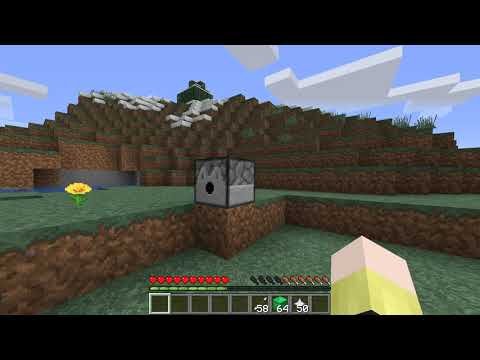
Breakable Bedrock - Use an efficiency 5 diamond pickaxe, click 15 times on bedrock with full durability to break it. Use silk touch to actually make it drop. Your pickaxe will lose all it's durability after this.
Staffs - Place a stick in an anvil and call it either "Doom Staff" or "Lightning Staff". Try left clicking at some targets. The doom staff also supports sneak-left-clicking for an alternative attack. These attacks do cost health.
Turning coal to diamond - Punching a block of coal has a 1/200 chance of dropping a diamond per punch.
Auto-Turrets
HoodCraft Turrets Guide
Spoiler
Base stats
Infinity: false
Range: 5.0
Arrow Launch Velocity: 0.4
Fire Rate: 64
Fully Upgraded stats
Infinity: True
Range: 64
Arrow Launch Velocity: 10.0
Fire Rate: 0
Ammo:
Only normal arrows are accepted (I might add support for others later)
Modifiers:
Infinity - Place a bow with infinity in a slot.
Detection Range - Place blocks of diamond in a single slot to upgrade range. Max Range is 64.
Arrow Launch Velocity - Place nether stars in a single slot to increase arrow launch velocity. Max launch velocity is 10.0.
Fire Rate - The lower the fire rate, the shorter the delay in ticks between shots allowed. Place blocks of emerald in a single slot to upgrade fire rate. Min delay is 0 ticks.
Creating a new turret:
Write the names of entities to target in a book (use a book and quill) each on their own line. You may use multiple pages. Then sign the book.
Place the written book into a dispenser and then sneak-left-click the dispenser to create a turret. You may now remove the book. The targets are stored in the turret.
Removing a turret:
Simply break the turret to remove it.
Targeting Modes:
Sneak-left-click your turret to switch targeting modes.
All - This targeting mode will target any living entity except for it's owner.
Whitelist - This targeting mode will only target the living entities specified. (Except the owner)
Blacklist - This targeting mode will target any living entity not specified in the targets book upon creation. (Except the owner)
Viewing Turret Stats
You can view the stats of turrets whether or not you own them. Just sneak-right-click any turret with an empty hand to see its stats.
Other turret details:
Turrets will push players back if they get too close and are not the owner.
Turrets protect their inventories from players who aren't their owner.
Turrets will prevent blocks being shift clicked onto them unless it is their owner.
Turrets can be mined by any player regardless of the owner. You should ensure that your turret has a good view of its surrounding to reduce chances of other players mining it.
Donations
If you would like to donate, I accept BTC:
1Dg9YLjigZXi6t7YRMhMmSYRghxZNmhsAK
Similar projects
Plugin →Let Me Despawn
Improves performance by tweaking mob despawn rules. Say bye to pesky unintentional persistent mobs.
25MSueta
JourneyMap
Real-time map used for mapping in-game or your browser as you explore.
14.7MSueta
Emotecraft
Create your own emotes in Minecraft.
7.5MSueta
Simple Tpa
A simple tpa plugin which sends requests
5.4MSueta
Common Network
Forge and Fabric Unified Networking Solution
3.9MSueta
Set Home
A lightweight plugin for players to set their homes.
3.8MSueta